To run this guide from your terminal or your coding agent, run `npx checkly init` in your project first. It installs the Checkly CLI and [Checkly Skills](/ai/skills) for your agent. Then paste the prompt below into Claude Code, Cursor, Codex, or any agent that supports skills. It builds the same setup as this guide, proves it with `npx checkly test --record`, and stops for your confirmation before `npx checkly deploy`.
```txt Prompt theme={null}
Restructure the Checkly project in this repository so it scales with the codebase.
Goal: one folder per service under `__checks__`, shared defaults in `checkly.config.ts`, a `CheckGroupV2` per service, and a GitHub Actions workflow that deploys on merge to `main`.
Success criteria:
1. Look at the services this repository contains and propose the service folders. Ask me to confirm before moving files.
2. Move shared settings (frequency, locations, tags, alert channels) into the `checks` defaults of `checkly.config.ts`. Keep `logicalId` unchanged.
3. Put one `group.ts` in each service folder with a `CheckGroupV2`. Give the API group an `API_BASE_URL` environment variable and make its checks use `{{API_BASE_URL}}`.
4. Put credentials in secrets with `npx checkly env add --secret`, never in code.
5. Add `.github/workflows/checkly-deploy.yml` that runs `npx checkly deploy --force` on pushes to `main` that touch `__checks__/**` or `checkly.config.ts`, reading `CHECKLY_API_KEY` from secrets and `CHECKLY_ACCOUNT_ID` from variables.
6. Run `npx checkly test --record`, then show me `npx checkly deploy --preview` and wait for my confirmation before deploying.
Explain each file you changed and why.
```
The steps below are the same work done by hand, so you can see what the agent built and why each piece is there.
## Step 1: One folder per service
The quickstart scaffold puts every check in a flat `__checks__` folder. That works for four files and stops working at forty. Split it by the services in your system, so the folder tells you who owns a check and what it covers.
```text Project layout theme={null}
checkly.config.ts
__checks__/
alert-channels.ts
web/
group.ts
homepage.check.ts
homepage.spec.ts
uptime.check.ts
api/
group.ts
books.check.ts
```
Each service folder gets a `group.ts` and its checks. The config's `checkMatch` glob finds check files at any depth, so nothing else changes when you add a folder.
## Step 2: Shared settings in one config
Put the defaults every check should inherit in `checkly.config.ts`, and the alert channel they share next to the checks.
```ts checkly.config.ts highlight={10-16} theme={null}
import { defineConfig } from 'checkly'
import { Frequency } from 'checkly/constructs'
import { opsEmail } from './__checks__/alert-channels'
export default defineConfig({
projectName: 'Docs guide: Structure a project',
logicalId: 'docs-guide-structure-a-project',
repoUrl: 'https://github.com/checkly/docs',
checks: {
// Defaults every check inherits unless a group or the check overrides them.
frequency: Frequency.EVERY_10M,
locations: ['us-east-1', 'eu-west-1'],
tags: ['shop'],
alertChannels: [opsEmail],
// Where to find checks. One folder per service keeps ownership obvious.
checkMatch: '**/__checks__/**/*.check.ts',
},
cli: {
runLocation: 'eu-west-1',
},
})
```
```ts __checks__/alert-channels.ts theme={null}
import { EmailAlertChannel } from 'checkly/constructs'
// One channel, attached to every check through the project defaults.
// The alerting guide tunes when and how often it fires.
export const opsEmail = new EmailAlertChannel('ops-email', {
address: 'ops@example.com',
sendFailure: true,
sendRecovery: true,
sendDegraded: false,
})
```
Settings resolve from the most specific level: a value on the check wins over the group, which wins over the project. Keep `logicalId` stable. Changing it makes Checkly treat the project as new and drops its history.
## Step 3: A group per service
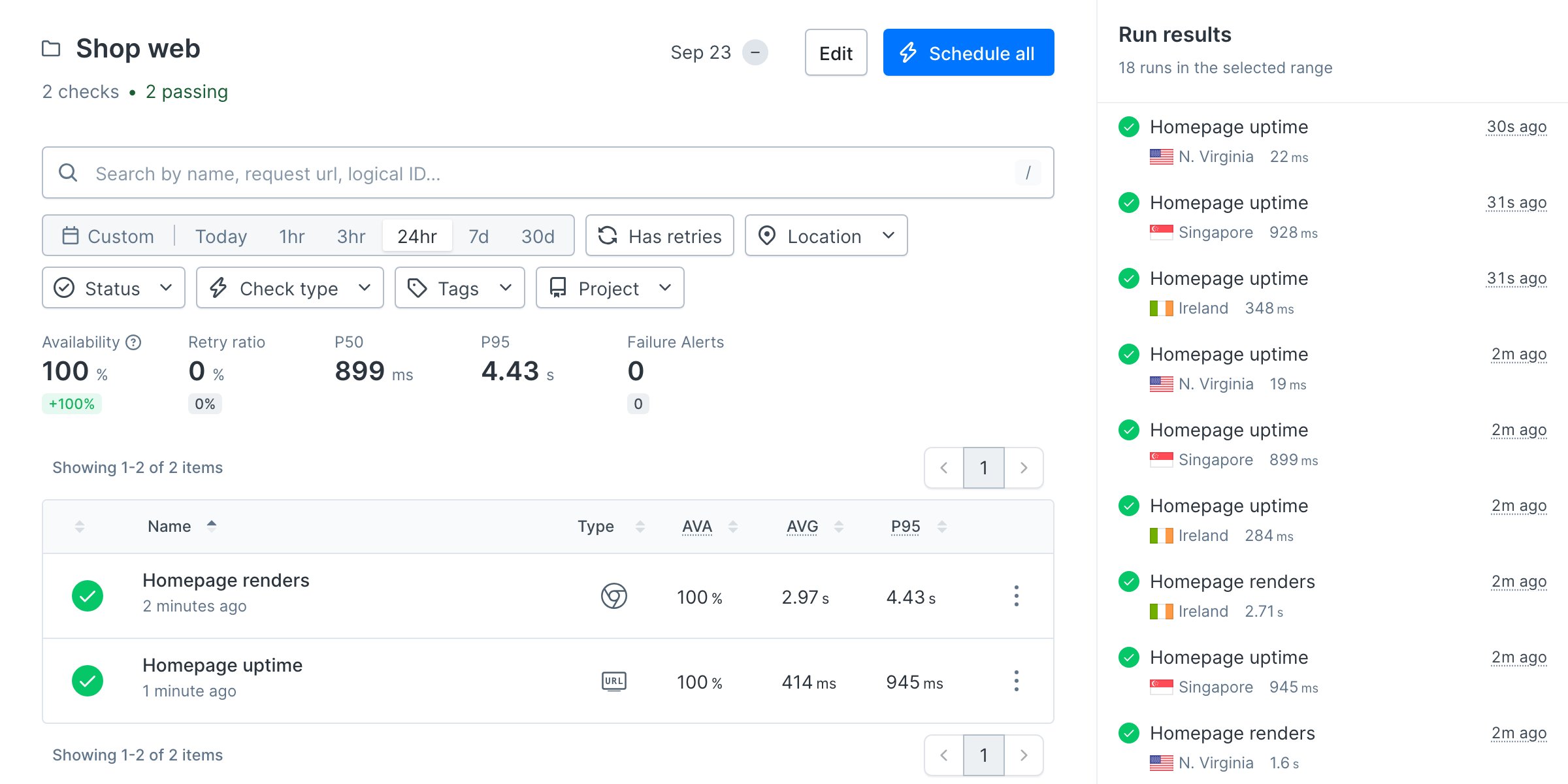
A group holds the settings that are true for a whole service and lets you run or mute that service as a unit. The storefront runs from three regions so a regional CDN problem shows up as a single-location failure.
```ts __checks__/web/group.ts theme={null}
import { CheckGroupV2 } from 'checkly/constructs'
// The storefront: user-facing pages. Runs from three regions so a
// regional CDN problem shows up as a single-location failure.
export const webGroup = new CheckGroupV2('shop-web', {
name: 'Shop web',
tags: ['web'],
locations: ['us-east-1', 'eu-west-1', 'ap-southeast-1'],
runParallel: true,
})
```
A check joins the group through its `group` property. The uptime monitor also overrides the project's ten-minute default, because a URL monitor is cheap enough to run every minute.
```ts __checks__/web/uptime.check.ts highlight={6,8} theme={null}
import { Frequency, UrlAssertionBuilder, UrlMonitor } from 'checkly/constructs'
import { webGroup } from './group'
new UrlMonitor('shop-homepage-uptime', {
name: 'Homepage uptime',
group: webGroup,
// Overrides the project default: uptime is cheap, run it more often.
frequency: Frequency.EVERY_1M,
degradedResponseTime: 3000,
maxResponseTime: 10000,
request: {
url: 'https://danube-web.shop/',
followRedirects: true,
assertions: [UrlAssertionBuilder.statusCode().equals(200)],
},
})
```
The API group carries a variable instead of locations. Every API check in the folder reads `{{API_BASE_URL}}`, so moving the API to a new host is a one-line change.
```ts __checks__/api/group.ts highlight={8-10} theme={null}
import { CheckGroupV2 } from 'checkly/constructs'
// The backend API. The base URL lives on the group, so every API check
// in this folder reads {{API_BASE_URL}} instead of repeating the host.
export const apiGroup = new CheckGroupV2('shop-api', {
name: 'Shop API',
tags: ['api'],
environmentVariables: [
{ key: 'API_BASE_URL', value: 'https://danube-web.shop/api' },
],
})
```
```ts __checks__/api/books.check.ts highlight={11} theme={null}
import { ApiCheck, AssertionBuilder } from 'checkly/constructs'
import { apiGroup } from './group'
new ApiCheck('shop-api-books', {
name: 'Books catalog',
group: apiGroup,
degradedResponseTime: 2000,
maxResponseTime: 5000,
request: {
method: 'GET',
url: '{{API_BASE_URL}}/books',
assertions: [
AssertionBuilder.statusCode().equals(200),
AssertionBuilder.headers('content-type').contains('application/json'),
AssertionBuilder.jsonBody('$.length').greaterThan(0),
AssertionBuilder.jsonBody('$[0].title').notEmpty(),
],
},
})
```
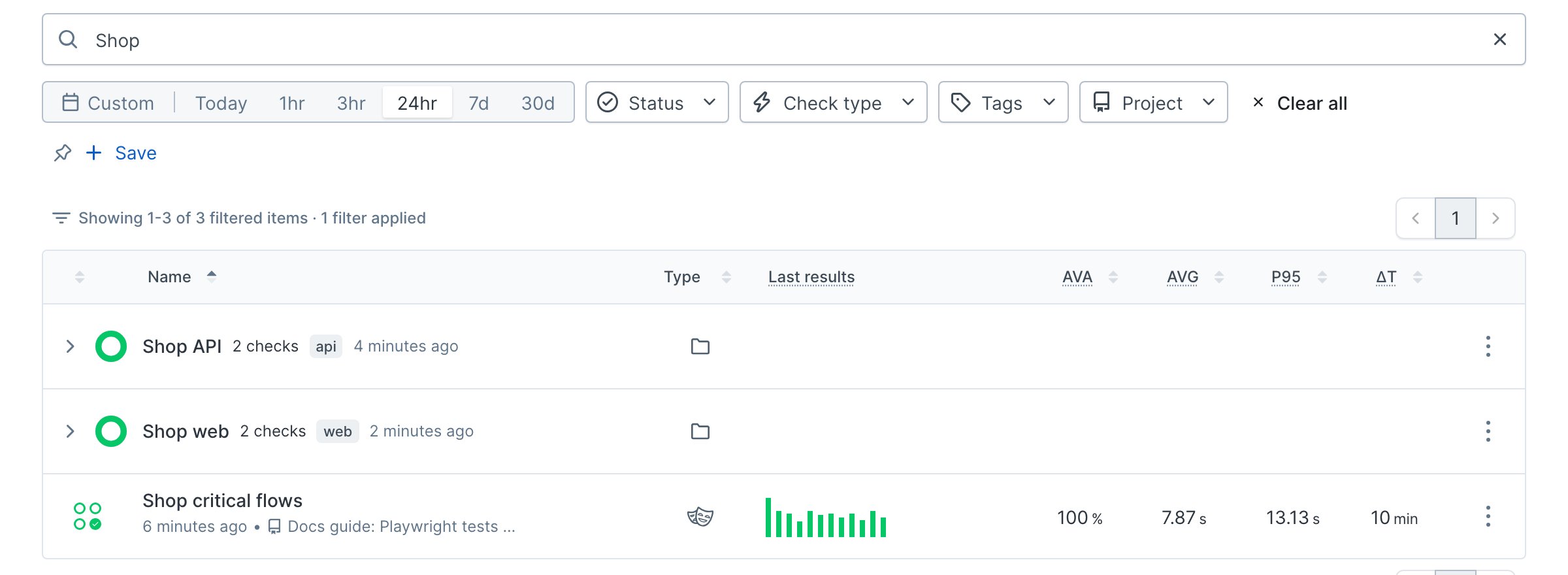 To follow along without your own app, clone the [sample project](https://github.com/checkly/docs/tree/main/samples/guides/structure-a-project). It monitors the [Danube demo shop](https://danube-web.shop) and its API.
 ## Step 4: Deploy from CI on every merge
Preview what the first deploy creates, then deploy once from your machine.
```bash Terminal theme={null}
npx checkly deploy --preview
```
```text Terminal theme={null}
Create:
EmailAlertChannel: ops-email
ApiCheck: shop-api-books
BrowserCheck: shop-homepage
UrlMonitor: shop-homepage-uptime
CheckGroupV2: shop-api
CheckGroupV2: shop-web
```
```bash Terminal theme={null}
npx checkly deploy
```
From here on, let CI do it. The workflow below redeploys the project whenever a merge to `main` touches monitoring code. Checkly diffs the project against what is deployed and applies only the change, so re-running it is safe.
```yaml .github/workflows/checkly-deploy.yml theme={null}
name: Deploy Checkly monitoring
# Every merge to main that touches monitoring code redeploys the project.
# Checkly diffs the project against what is deployed and applies the change.
on:
push:
branches: [main]
paths:
- '__checks__/**'
- 'checkly.config.ts'
- 'package-lock.json'
jobs:
deploy:
runs-on: ubuntu-latest
steps:
- uses: actions/checkout@v4
- uses: actions/setup-node@v4
with:
node-version: 22
cache: npm
- run: npm ci
- run: npx checkly deploy --force
env:
CHECKLY_API_KEY: ${{ secrets.CHECKLY_API_KEY }}
CHECKLY_ACCOUNT_ID: ${{ vars.CHECKLY_ACCOUNT_ID }}
```
Store `CHECKLY_API_KEY` as a repository secret and `CHECKLY_ACCOUNT_ID` as a repository variable. Both come from your Checkly settings, described in [CLI authentication](/cli/authentication). The `--force` flag skips the interactive confirmation.
## Step 4: Deploy from CI on every merge
Preview what the first deploy creates, then deploy once from your machine.
```bash Terminal theme={null}
npx checkly deploy --preview
```
```text Terminal theme={null}
Create:
EmailAlertChannel: ops-email
ApiCheck: shop-api-books
BrowserCheck: shop-homepage
UrlMonitor: shop-homepage-uptime
CheckGroupV2: shop-api
CheckGroupV2: shop-web
```
```bash Terminal theme={null}
npx checkly deploy
```
From here on, let CI do it. The workflow below redeploys the project whenever a merge to `main` touches monitoring code. Checkly diffs the project against what is deployed and applies only the change, so re-running it is safe.
```yaml .github/workflows/checkly-deploy.yml theme={null}
name: Deploy Checkly monitoring
# Every merge to main that touches monitoring code redeploys the project.
# Checkly diffs the project against what is deployed and applies the change.
on:
push:
branches: [main]
paths:
- '__checks__/**'
- 'checkly.config.ts'
- 'package-lock.json'
jobs:
deploy:
runs-on: ubuntu-latest
steps:
- uses: actions/checkout@v4
- uses: actions/setup-node@v4
with:
node-version: 22
cache: npm
- run: npm ci
- run: npx checkly deploy --force
env:
CHECKLY_API_KEY: ${{ secrets.CHECKLY_API_KEY }}
CHECKLY_ACCOUNT_ID: ${{ vars.CHECKLY_ACCOUNT_ID }}
```
Store `CHECKLY_API_KEY` as a repository secret and `CHECKLY_ACCOUNT_ID` as a repository variable. Both come from your Checkly settings, described in [CLI authentication](/cli/authentication). The `--force` flag skips the interactive confirmation.