> ## Documentation Index
> Fetch the complete documentation index at: https://checkly-422f444a-onboarding-guides-plan.mintlify.site/llms.txt
> Use this file to discover all available pages before exploring further.
# Run checks on every deploy
> Test pull request previews before merging, trigger deployed checks after production deployments, and record the commit, branch, and environment.
export const CopyPromptButton = ({label = "Copy setup prompt", targetId = "ai-setup-prompt"}) => {
const [copied, setCopied] = useState(false);
const handleCopy = async () => {
try {
const el = document.getElementById(targetId);
const code = el?.querySelector("code");
const text = code?.textContent || el?.textContent || "";
await navigator.clipboard.writeText(text);
setCopied(true);
setTimeout(() => setCopied(false), 2000);
} catch (err) {
console.error("Failed to copy prompt:", err);
}
};
return ;
};
By the end of this guide, your pull requests will test their preview URL before merge, your production deploys will trigger deployed checks and fail the validation workflow on failures, and each test session will identify its commit, branch, and environment.
The [sample project](https://github.com/checkly/docs/tree/main/samples/guides/checks-on-deploy) monitors the Danube shop with one URL monitor and one Browser Check.
To run this guide from your terminal or your coding agent, run `npx checkly init` in your project first. It installs the Checkly CLI and [Checkly Skills](/ai/skills) for your agent. Then paste the prompt below into Claude Code, Cursor, Codex, or any agent that supports skills. It builds the same setup as this guide, proves it with `npx checkly test --record`, and stops for your confirmation before `npx checkly deploy`.
```txt theme={null}
Set up checks on every deploy using samples/guides/checks-on-deploy.
Use ENVIRONMENT_URL for a Danube shop URL monitor and Browser Check.
Run npx checkly test --record, then stop for confirmation before
npx checkly deploy. Add two checkly/checkly-action@v1 workflows:
pull_request runs test against the ready preview for that exact commit
with reporting auto; successful production deployment_status events
run trigger with tags and reporting github-actions. Require the PR
job and external Checkly result before merging. Record the environment
with CHECKLY_TEST_ENVIRONMENT and preserve commit and branch metadata.
Prove a wrong URL fails and the correct URL passes. Validate workflow
YAML and report separately whether the workflows ran in CI.
```
The steps below are what the agent does, in the open.
## 1. Give both checks an environment URL
Complete the [quickstart](/quickstart) first.
Your deployment provider must publish GitHub deployments for each PR head commit, with a successful status and a reachable `environment_url`. The preview workflow looks for the environment named `Preview`; change that name to match your provider. Production deployments must set `production_environment: true`.
Store your Checkly API key as the GitHub Actions secret `CHECKLY_API_KEY`, and your account ID as the variable `CHECKLY_ACCOUNT_ID`. Use a key for the account that owns your deployed checks. These examples need trusted PRs with access to that secret; fork PRs do not receive repository secrets.
Copy the sample into `samples/guides/checks-on-deploy` in your repository and run `npm ci` there. Keep this directory layout for the workflows below.
The sample's `checkly.config.ts` selects `__checks__/**/*.check.ts`, sets a ten-minute schedule, and tags both checks `guide-checks-on-deploy`:
```typescript __checks__/shop.check.ts theme={null}
import { BrowserCheck, UrlAssertionBuilder, UrlMonitor } from 'checkly/constructs'
import * as path from 'path'
const environmentVariables = [
{ key: 'ENVIRONMENT_URL', value: 'https://danube-web.shop' },
]
new UrlMonitor('deploy-shop-url', {
name: 'Deploy: shop responds',
request: {
url: process.env.ENVIRONMENT_URL || 'https://danube-web.shop',
assertions: [UrlAssertionBuilder.statusCode().equals(200)],
},
})
new BrowserCheck('deploy-shop-browser', {
name: 'Deploy: shop displays books',
environmentVariables,
code: { entrypoint: path.join(__dirname, 'shop.spec.ts') },
})
```
The URL monitor reads the local variable when the CLI builds it. The Browser Check reads the remote variable when Playwright runs:
```typescript __checks__/shop.spec.ts theme={null}
import { test, expect } from '@playwright/test'
test('shop displays books', async ({ page }) => {
console.log(`Environment: ${process.env.ENVIRONMENT_URL}`)
await page.goto(process.env.ENVIRONMENT_URL!)
await expect(page.locator('.preview-title').first()).toBeVisible()
})
```
Both [Browser Checks](/detect/synthetic-monitoring/browser-checks/overview) and [Playwright Check Suites](/detect/synthetic-monitoring/playwright-checks/overview) work with this deployment pattern. This sample uses a Browser Check. For a target behind your firewall, see [private locations](/platform/private-locations/overview).
From the sample directory, test and deploy the production defaults:
```bash Terminal theme={null}
npx checkly test --record --env ENVIRONMENT_URL=https://danube-web.shop --test-session-name 'Docs guide: Run checks on every deploy | production'
npx checkly deploy --force
```
The recorded run passed both checks. Deploying then created the scheduled monitors:
```text Terminal theme={null}
Successfully deployed project "Docs guide: Run checks on every deploy" to account "Checkly Marketing".
```
When adapting the sample, replace both Danube defaults with your production URL and set `repoUrl` in `checkly.config.ts` to your repository. Deploy with the production URL, since `trigger` uses the URL monitor's saved request URL.
## 2. Test the ready preview before merging
Copy this workflow from the sample into your repository's root `.github/workflows/`. It waits up to ten minutes for a successful `Preview` deployment of the PR head commit, then runs `npx checkly test` through the Action.
```yaml .github/workflows/checkly-preview.yml theme={null}
name: Checkly preview
on:
pull_request:
permissions:
contents: read
deployments: read
jobs:
preview:
name: Checkly preview job
runs-on: ubuntu-latest
steps:
- uses: actions/checkout@v4
with:
ref: ${{ github.event.pull_request.head.sha }}
- name: Wait for this commit's preview deployment
id: preview
env:
GH_TOKEN: ${{ github.token }}
REPOSITORY: ${{ github.repository }}
HEAD_SHA: ${{ github.event.pull_request.head.sha }}
run: |
for attempt in $(seq 1 60); do
deployment_id=$(gh api "repos/$REPOSITORY/deployments?sha=$HEAD_SHA&per_page=100" \
--jq '[.[] | select(.environment == "Preview" and .production_environment == false)][0].id // empty')
if [ -n "$deployment_id" ]; then
url=$(gh api "repos/$REPOSITORY/deployments/$deployment_id/statuses" \
--jq '.[0] | select(.state == "success") | .environment_url // empty')
if [ -n "$url" ]; then
echo "url=$url" >> "$GITHUB_OUTPUT"
exit 0
fi
fi
sleep 10
done
echo "No successful Preview deployment for $HEAD_SHA" >&2
exit 1
- uses: checkly/checkly-action@v1
with:
command: test
working-directory: samples/guides/checks-on-deploy
install-command: npm ci
reporting: auto
github-check-name: Checkly preview results
test-session-name: "Deploy checks | Preview | ${{ steps.preview.outputs.url }}"
env: ENVIRONMENT_URL=${{ steps.preview.outputs.url }}
env:
CHECKLY_API_KEY: ${{ secrets.CHECKLY_API_KEY }}
CHECKLY_ACCOUNT_ID: ${{ vars.CHECKLY_ACCOUNT_ID }}
CHECKLY_TEST_ENVIRONMENT: Preview
ENVIRONMENT_URL: ${{ steps.preview.outputs.url }}
```
The step's `env.ENVIRONMENT_URL` supplies the URL monitor at build time; `with.env` passes it to the browser at runtime. Neither changes the deployed production checks.
With `reporting: auto`, a connected Checkly GitHub App can report asynchronously through **Checkly preview results**. Otherwise, the Action waits and reports through **Checkly preview job**. Follow the [GitHub Actions integration](/integrations/ci-cd/github/actions) to connect the app from your Checkly account.
Set branch rules to require **Checkly preview job** and, when using the GitHub App, **Checkly preview results**. The job alone can pass while the external Checkly result is still running. Confirm which reporting mode your first PR uses before enabling required checks.
## 3. Validate each production deployment
Copy the second workflow into the same root workflow directory. Your deployment provider must emit a successful GitHub deployment status for every production release.
```yaml .github/workflows/checkly-production.yml theme={null}
name: Checkly production
on:
deployment_status:
permissions:
contents: read
jobs:
production:
if: >-
github.event.deployment_status.state == 'success' &&
github.event.deployment.production_environment == true
runs-on: ubuntu-latest
steps:
- uses: actions/checkout@v4
with:
ref: ${{ github.event.deployment.sha }}
- uses: checkly/checkly-action@v1
with:
command: trigger
working-directory: samples/guides/checks-on-deploy
install-command: npm ci
reporting: github-actions
tags: guide-checks-on-deploy
github-sha: ${{ github.event.deployment.sha }}
test-session-name: "Deploy checks | ${{ github.event.deployment.environment }} | ${{ github.event.deployment_status.environment_url }}"
env: ENVIRONMENT_URL=${{ github.event.deployment_status.environment_url }}
env:
CHECKLY_API_KEY: ${{ secrets.CHECKLY_API_KEY }}
CHECKLY_ACCOUNT_ID: ${{ vars.CHECKLY_ACCOUNT_ID }}
CHECKLY_TEST_ENVIRONMENT: ${{ github.event.deployment.environment }}
CHECKLY_REPO_BRANCH: ${{ github.event.deployment.ref }}
```
This runs `npx checkly trigger` against deployed checks with the sample's tag. `reporting: github-actions` waits and fails the validation workflow if a check fails. It also fails if no checks match. This happens after deployment; it does not roll back the release or change an already completed deployment job.
The Action supplies commit metadata from the event. Checkout uses the same SHA, and `CHECKLY_REPO_BRANCH` preserves the deployment ref. Have your provider send a branch name as that ref if you want a branch label rather than a SHA. `CHECKLY_TEST_ENVIRONMENT` fills the session's **Environment** field; `ENVIRONMENT_URL` selects the browser's target.
For local runs, the CLI reads git metadata from your checkout and `repoUrl` from the project config. Uncommitted edits are tested, but the recorded SHA still identifies the current commit. Commit your checks before using that SHA to reproduce a run.
`CHECKLY_RUN_SOURCE` describes what started a run, not its environment or commit. In Playwright Check Suites, recorded CLI tests use `TEST_RECORD`, recorded triggers use `TRIGGER_RECORD`, and scheduled runs use `SCHEDULER`. A GitHub Action running `trigger` is still `TRIGGER_RECORD`; `DEPLOYMENT` denotes a Checkly deployment hook. This sample's Browser Check did not expose that variable, so it logs the target URL instead.
## Verify it works
From the sample directory, intentionally use a wrong path. The local variable changes the URL monitor's build; `--env` changes the browser's runtime target:
```bash Terminal theme={null}
export CHECKLY_TEST_ENVIRONMENT=Preview
ENVIRONMENT_URL=https://danube-web.shop/does-not-exist npx checkly test --record --env ENVIRONMENT_URL=https://danube-web.shop/does-not-exist --test-session-name 'Docs guide: Run checks on every deploy | verified failure'
```
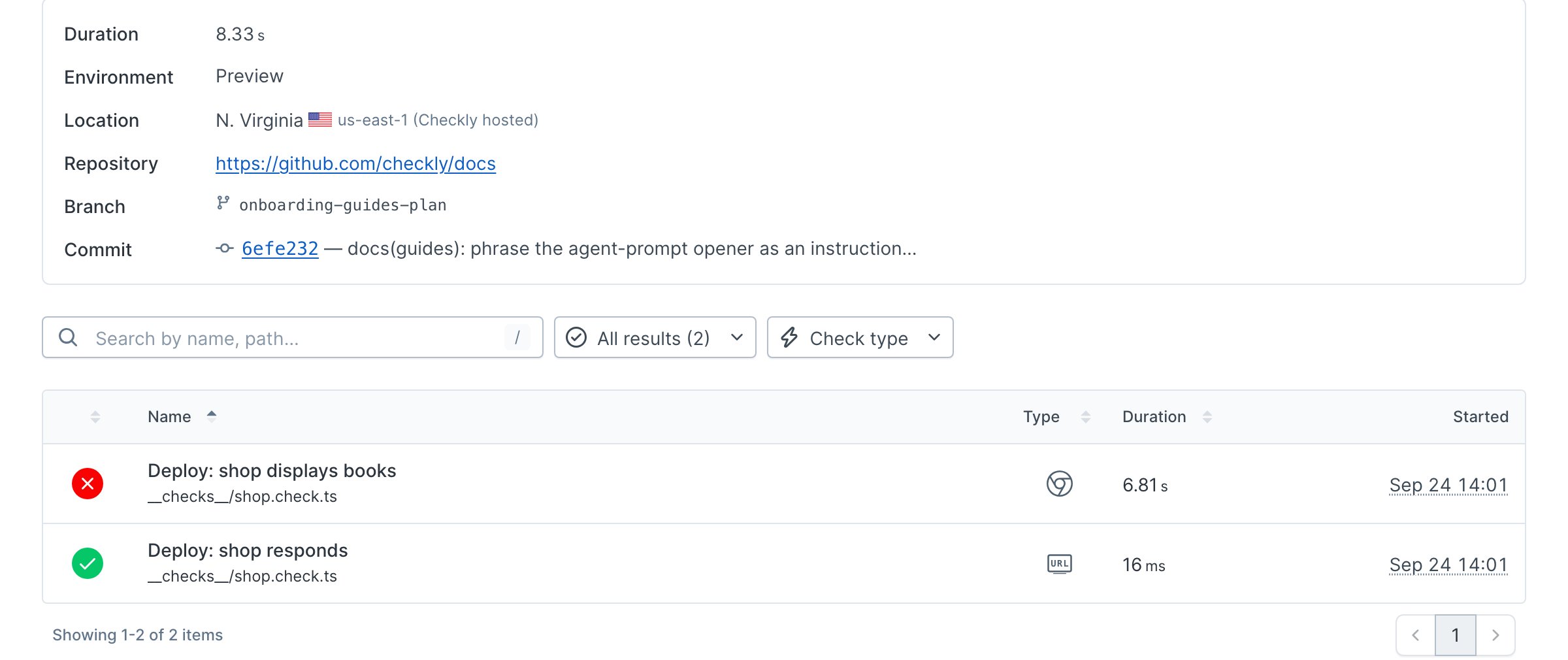
Danube returns HTTP 200 for this path, so the URL monitor passes. The browser detects the missing book list and the CLI exits with code 1:
```text Terminal theme={null}
1 failed, 1 passed, 2 total
```
Restore the URL and label the session:
```bash Terminal theme={null}
export CHECKLY_TEST_ENVIRONMENT=Production
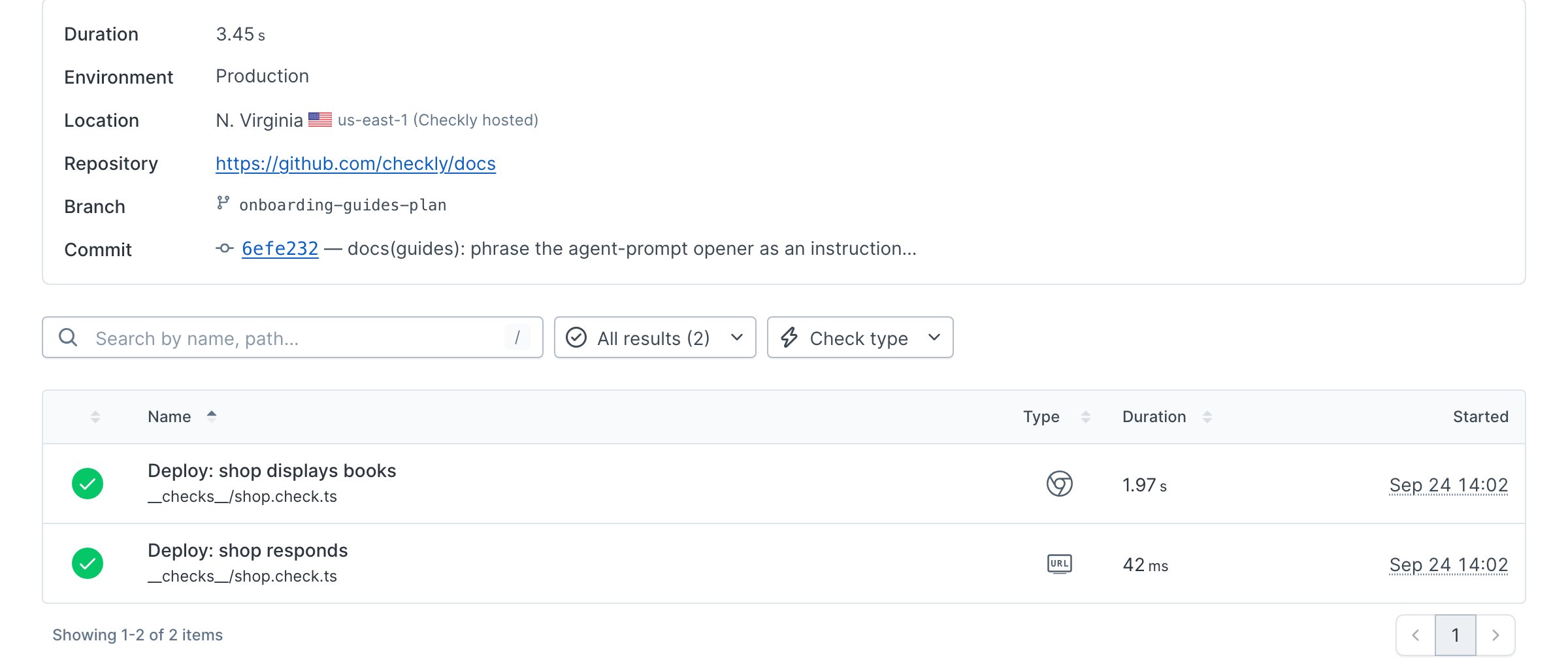
npx checkly test --record --env ENVIRONMENT_URL=https://danube-web.shop --test-session-name 'Docs guide: Run checks on every deploy | verified pass'
```
```text Terminal theme={null}
2 passed, 2 total
```
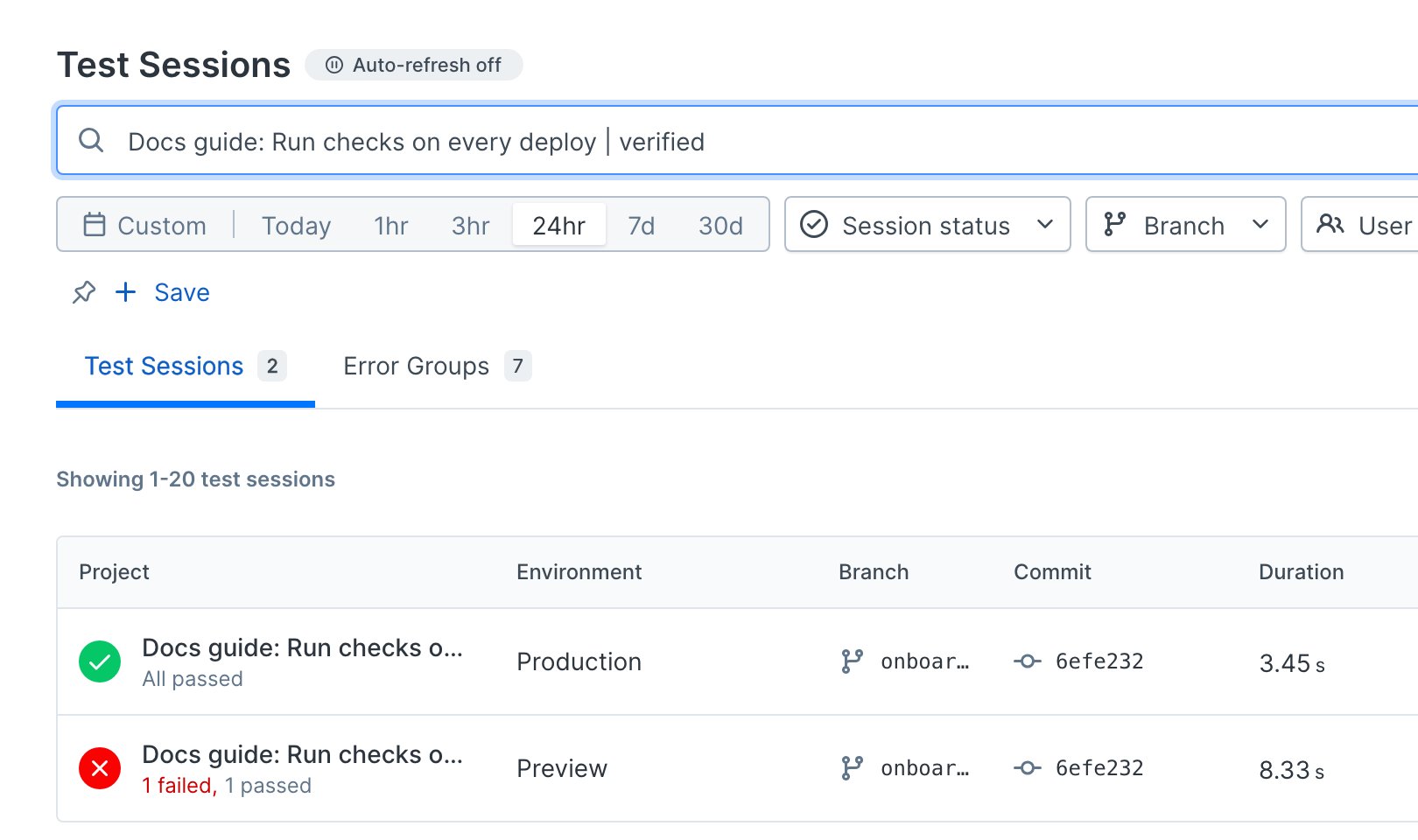
Open the session link printed by the CLI to see its git metadata and environment. In **Test sessions**, search for the session name to compare the failed and passing runs:
The sample also passed a local `npx checkly trigger --tags guide-checks-on-deploy` run. Both workflow files were parsed as YAML; they were not executed in CI. After configuring your provider and secrets, open a PR and deploy to production to verify both workflow paths in your repository.
## Next
[Set up alerting](/guides/alerting) so failures on the production monitoring schedule reach your team between deploys.
## Reference
* [GitHub Actions](/integrations/ci-cd/github/actions)
* [GitHub deployments](/integrations/ci-cd/github/deployments)
* [checkly test](/cli/checkly-test)
* [checkly trigger](/cli/checkly-trigger)
* [Environment variables](/cli/environment-variables)
* [Built-in Playwright Check Suite variables](/detect/synthetic-monitoring/playwright-checks/environment-variables)
 The [sample project](https://github.com/checkly/docs/tree/main/samples/guides/checks-on-deploy) monitors the Danube shop with one URL monitor and one Browser Check.
 Restore the URL and label the session:
```bash Terminal theme={null}
export CHECKLY_TEST_ENVIRONMENT=Production
npx checkly test --record --env ENVIRONMENT_URL=https://danube-web.shop --test-session-name 'Docs guide: Run checks on every deploy | verified pass'
```
```text Terminal theme={null}
2 passed, 2 total
```
Open the session link printed by the CLI to see its git metadata and environment. In **Test sessions**, search for the session name to compare the failed and passing runs:
Restore the URL and label the session:
```bash Terminal theme={null}
export CHECKLY_TEST_ENVIRONMENT=Production
npx checkly test --record --env ENVIRONMENT_URL=https://danube-web.shop --test-session-name 'Docs guide: Run checks on every deploy | verified pass'
```
```text Terminal theme={null}
2 passed, 2 total
```
Open the session link printed by the CLI to see its git metadata and environment. In **Test sessions**, search for the session name to compare the failed and passing runs:
 The sample also passed a local `npx checkly trigger --tags guide-checks-on-deploy` run. Both workflow files were parsed as YAML; they were not executed in CI. After configuring your provider and secrets, open a PR and deploy to production to verify both workflow paths in your repository.
## Next
[Set up alerting](/guides/alerting) so failures on the production monitoring schedule reach your team between deploys.
## Reference
* [GitHub Actions](/integrations/ci-cd/github/actions)
* [GitHub deployments](/integrations/ci-cd/github/deployments)
* [checkly test](/cli/checkly-test)
* [checkly trigger](/cli/checkly-trigger)
* [Environment variables](/cli/environment-variables)
* [Built-in Playwright Check Suite variables](/detect/synthetic-monitoring/playwright-checks/environment-variables)
The sample also passed a local `npx checkly trigger --tags guide-checks-on-deploy` run. Both workflow files were parsed as YAML; they were not executed in CI. After configuring your provider and secrets, open a PR and deploy to production to verify both workflow paths in your repository.
## Next
[Set up alerting](/guides/alerting) so failures on the production monitoring schedule reach your team between deploys.
## Reference
* [GitHub Actions](/integrations/ci-cd/github/actions)
* [GitHub deployments](/integrations/ci-cd/github/deployments)
* [checkly test](/cli/checkly-test)
* [checkly trigger](/cli/checkly-trigger)
* [Environment variables](/cli/environment-variables)
* [Built-in Playwright Check Suite variables](/detect/synthetic-monitoring/playwright-checks/environment-variables)