> ## Documentation Index
> Fetch the complete documentation index at: https://checkly-422f444a-onboarding-guides-plan.mintlify.site/llms.txt
> Use this file to discover all available pages before exploring further.
# Turn your Playwright tests into monitors
> Run the Playwright tests you already have as scheduled production monitors with a Playwright Check Suite, without rewriting them.
export const CopyPromptButton = ({label = "Copy setup prompt", targetId = "ai-setup-prompt"}) => {
const [copied, setCopied] = useState(false);
const handleCopy = async () => {
try {
const el = document.getElementById(targetId);
const code = el?.querySelector("code");
const text = code?.textContent || el?.textContent || "";
await navigator.clipboard.writeText(text);
setCopied(true);
setTimeout(() => setCopied(false), 2000);
} catch (err) {
console.error("Failed to copy prompt:", err);
}
};
return ;
};
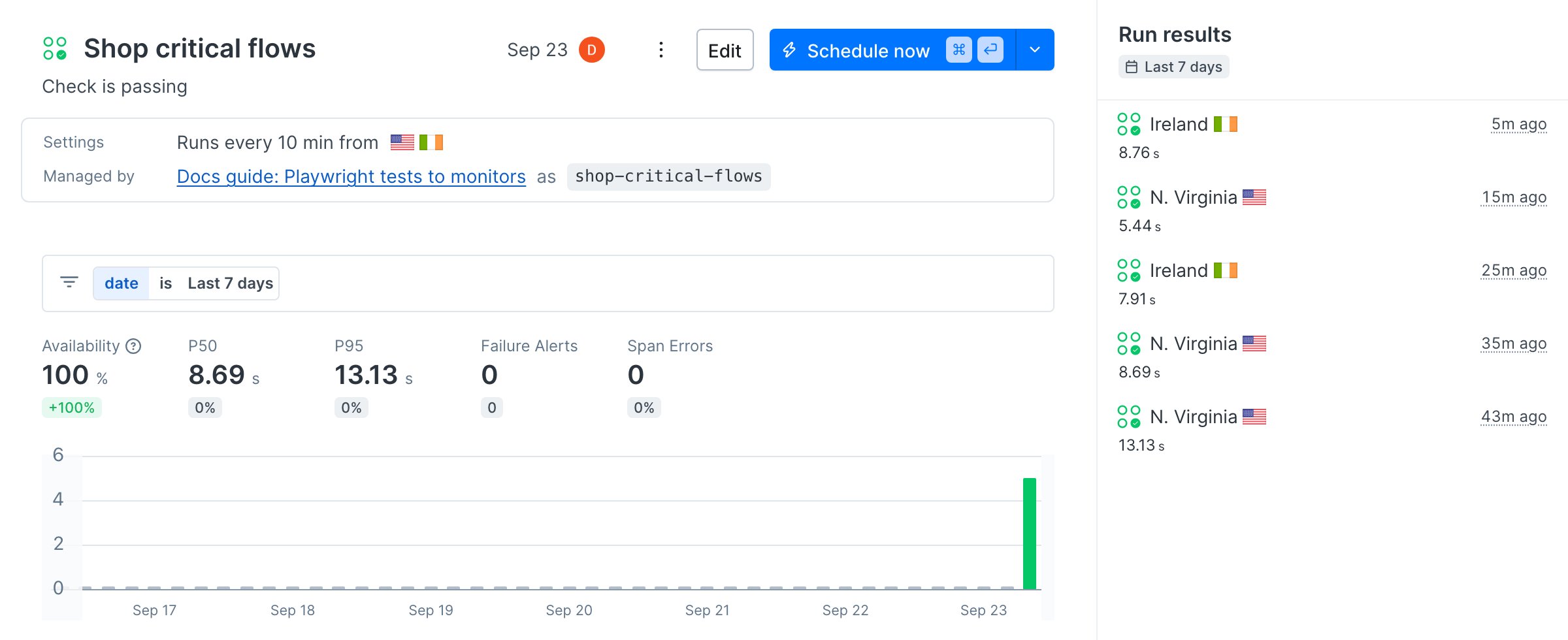
By the end of this guide, two of your existing Playwright tests run against production every ten minutes from two regions, and you have seen what a failure looks like before a real one happens.
No Playwright project handy? Clone the [sample project](https://github.com/checkly/docs/tree/main/samples/guides/playwright-to-monitoring) this guide is built on. It runs against the [Danube demo shop](https://danube-web.shop).
To run this guide from your terminal or your coding agent, run `npx checkly init` in your project first. It installs the Checkly CLI and [Checkly Skills](/ai/skills) for your agent. Then paste the prompt below into Claude Code, Cursor, Codex, or any agent that supports skills. It builds the same setup as this guide, proves it with `npx checkly test --record`, and stops for your confirmation before `npx checkly deploy`.
```txt Prompt theme={null}
Turn the Playwright tests in this repository into Checkly production monitors.
Goal: a Playwright Check Suite that runs only the tests worth alerting on, every 10 minutes, from us-east-1 and eu-west-1.
Success criteria:
1. Add a `monitoring` project to my existing `playwright.config.ts` that selects tests tagged `@monitor`. Do not change the other projects.
2. Use `process.env.CHECKLY === '1'` to point `baseURL` at production on Checkly and keep local runs on my dev server. Set `maxFailures: 1` and `retries: 2` for Checkly runs only.
3. Tag at most two critical user-flow tests with `@monitor`. Ask me which ones if it is not obvious. Never tag tests that create accounts or mutate data.
4. Create `checkly.config.ts` with one entry in `playwrightChecks` that selects the `monitoring` project.
5. Run `npx checkly test --record` and show me the session link.
6. Stop. Show me `npx checkly deploy --preview` and wait for my confirmation before `npx checkly deploy`.
Explain each file you changed and why.
```
Every step below is what the agent just did, in the open, so you can read the result or do it by hand.
## Step 1: Pick the tests that become monitors
Not every test belongs in production monitoring. The sample has three: a search, a checkout, and a signup. Signup creates accounts, so it stays in CI. Search and checkout are what you want to know about within minutes, so they get a `@monitor` tag.
```ts tests/checkout.spec.ts highlight={3} theme={null}
import { test, expect } from '@playwright/test'
test('checkout completes', { tag: '@monitor' }, async ({ page }) => {
await page.goto('/')
// Add the first two books to the cart.
for (const position of [1, 2]) {
await page.locator(`.preview:nth-child(${position}) > .preview-author`).click()
await page.getByRole('button', { name: 'Add to cart' }).click()
await page.locator('#logo').click()
}
await page.locator('#cart').click()
await page.getByRole('button', { name: 'Checkout' }).click()
await page.getByPlaceholder('Name', { exact: true }).fill('Max')
await page.getByPlaceholder('Surname', { exact: true }).fill('Mustermann')
await page.getByPlaceholder('Address').fill('Charlottenstr. 57')
await page.getByPlaceholder('Zipcode').fill('10117')
await page.getByPlaceholder('City').fill('Berlin')
await page.getByPlaceholder('Company (optional)').fill('Firma GmbH')
await page.getByLabel('as soon as possible').check()
await page.getByRole('button', { name: 'Buy' }).click()
await expect(page.locator('#order-confirmation')).toContainText('Thank you')
})
```
Then give the tagged tests their own Playwright project. Checkly sets `CHECKLY=1` on every run, which is the one switch you need to point monitoring at production while local runs keep using your dev server.
```ts playwright.config.ts highlight={5,10,13,25-26} theme={null}
import { defineConfig, devices } from '@playwright/test'
// Checkly sets CHECKLY=1 on every run. Use it to point monitoring at
// production while local runs keep hitting your dev server.
const onCheckly = process.env.CHECKLY === '1'
export default defineConfig({
testDir: './tests',
retries: onCheckly ? 2 : 0,
// Stop after the first failure on Checkly so alerts fire sooner.
maxFailures: onCheckly ? 1 : 0,
use: {
baseURL: onCheckly ? 'https://danube-web.shop' : 'http://localhost:3000',
trace: 'retain-on-failure',
},
projects: [
// Everything, for local runs and CI.
{
name: 'chromium',
use: { ...devices['Desktop Chrome'] },
},
// Only the flows worth waking someone up for.
{
name: 'monitoring',
grep: /@monitor/,
use: { ...devices['Desktop Chrome'] },
},
],
})
```
Three settings matter for monitoring and not for testing. `baseURL` makes the same `page.goto('/')` hit production on Checkly. `maxFailures: 1` stops the run at the first failure so the alert goes out sooner. `retries` absorbs a transient network blip before it becomes an alert. Checkly records a trace on every run regardless of your `trace` setting.
If your config starts a `webServer`, guard it the same way: `webServer: onCheckly ? undefined : { ... }`. On Checkly the deployed site is already running.
## Step 2: Define the monitor
Install the CLI if this repository does not have it yet, then describe the monitor in a `checkly.config.ts` next to your Playwright config.
```bash Terminal theme={null}
npm install --save-dev checkly
```
A Playwright Check Suite reuses your Playwright config and runs a whole project. A Browser Check runs a single spec file with Checkly's own Playwright setup. Pick one.
```ts checkly.config.ts (Playwright Check Suite) theme={null}
import { defineConfig } from 'checkly'
import { Frequency } from 'checkly/constructs'
export default defineConfig({
projectName: 'Docs guide: Playwright tests to monitors',
logicalId: 'docs-guide-playwright-to-monitoring',
checks: {
// Reuse the Playwright config your tests already run with.
playwrightConfigPath: './playwright.config.ts',
playwrightChecks: [
{
name: 'Shop critical flows',
logicalId: 'shop-critical-flows',
// Run only the `monitoring` project: the @monitor-tagged tests.
pwProjects: ['monitoring'],
frequency: Frequency.EVERY_10M,
locations: ['us-east-1', 'eu-west-1'],
},
],
},
cli: {
runLocation: 'eu-west-1',
},
})
```
```ts checks/checkout.check.ts (Browser Check) theme={null}
import { BrowserCheck, Frequency } from 'checkly/constructs'
import * as path from 'path'
// The single-file alternative: one spec file becomes one Browser Check.
// Browser Checks run the file on its own, without playwright.config.ts,
// so the spec uses full URLs instead of baseURL.
new BrowserCheck('shop-checkout-browser-check', {
name: 'Shop checkout (Browser Check)',
frequency: Frequency.EVERY_10M,
locations: ['us-east-1', 'eu-west-1'],
code: {
entrypoint: path.join(__dirname, 'checkout.spec.ts'),
},
})
```
The Check Suite path needs nothing else: the `pwProjects` entry selects the `monitoring` project, and the suite runs every ten minutes from Virginia and Ireland. The Browser Check path needs a copy of the spec with `page.goto('https://danube-web.shop/')`, because there is no `playwright.config.ts` to supply `baseURL`. The sample keeps that copy in `checks/checkout.spec.ts`.
Prefer to have your coding agent write this file? The [Playwright Check Suite quickstart](/detect/synthetic-monitoring/playwright-checks/quickstart) has a prompt that inspects your Playwright config and generates the `checkly.config.ts`.
## Step 3: Run it on Checkly before you deploy
`npx checkly test` bundles the project, runs it on Checkly's infrastructure, and streams the result back. `--record` keeps the run so you can open it in the app.
```bash Terminal theme={null}
npx checkly test --record
```
```text Terminal theme={null}
Parsing your project... ✅
Validating project resources... ✅
Bundling project resources... ✅
Uploading Playwright tests... ✅
Test session ID: 01a0ce89-ce0c-74e1-8ee7-e95a2430af87
Open session: https://app.checklyhq.com/accounts//test-sessions/01a0ce89-ce0c-74e1-8ee7-e95a2430af87
Running 2 checks in eu-west-1.
checks/checkout.check.ts
✔ Shop checkout (Browser Check) (7s)
playwright.config.ts
✔ Shop critical flows (12s)
2 passed, 2 total
```
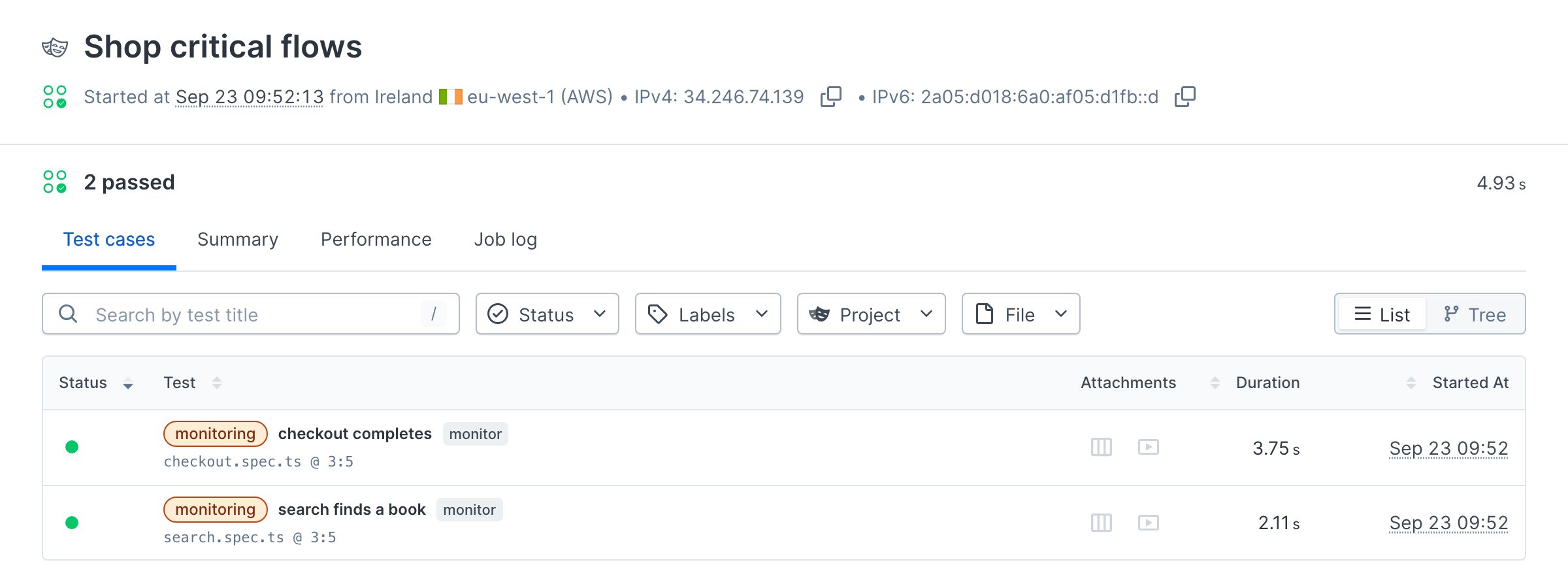
Both variants from step 2 ran because the sample contains both. Open the session link. Each test in the suite shows its steps, timing, a trace, and a video, the same artifacts you get from a local run.
## Step 4: Deploy
```bash Terminal theme={null}
npx checkly deploy
```
```text Terminal theme={null}
Parsing your project... ✅
Validating project resources... ✅
Bundling project resources... ✅
Uploading Playwright tests... ✅
Deploying project... ✅
Successfully deployed project "Docs guide: Playwright tests to monitors" to account "Checkly Marketing".
```
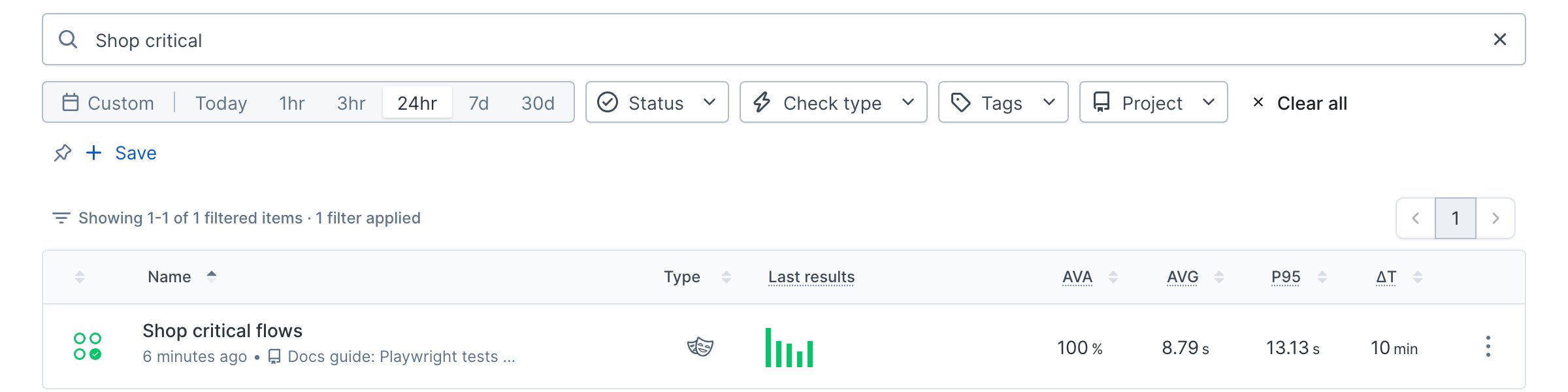
The suite now runs on its schedule. The first run starts immediately with `CHECKLY_RUN_SOURCE=CLI_DEPLOY`, then every ten minutes from both locations. It appears in your check list as a Playwright check.
Every later `npx checkly deploy` updates the suite in place, so the monitor changes whenever the tests do. Wire that into CI and the tests and the monitors ship together.
## Verify it works
Break the checkout on purpose before production does. Rename the `Buy` button in the spec to `Purchase` and run the suite again, without deploying.
```bash Terminal theme={null}
npx checkly test --record --grep "Shop critical flows"
```
```text Terminal theme={null}
Running 1 checks in eu-west-1.
playwright.config.ts
✖ Shop critical flows (101s)
09:53:59 ERROR Error: locator.click: Test timeout of 30000ms exceeded.
Call log:
- waiting for getByRole('button', { name: 'Purchase' })
at tests/checkout.spec.ts:23:56
09:55:04 INFO 1 ✘ [monitoring] checkout.spec.ts > checkout completes
09:55:04 INFO 2 ✓ [monitoring] search.spec.ts > search finds a book
09:55:04 ERROR Testing stopped early after 1 maximum allowed failures.
View result: https://chkly.link/l/_rONl
1 failed, 1 total
```
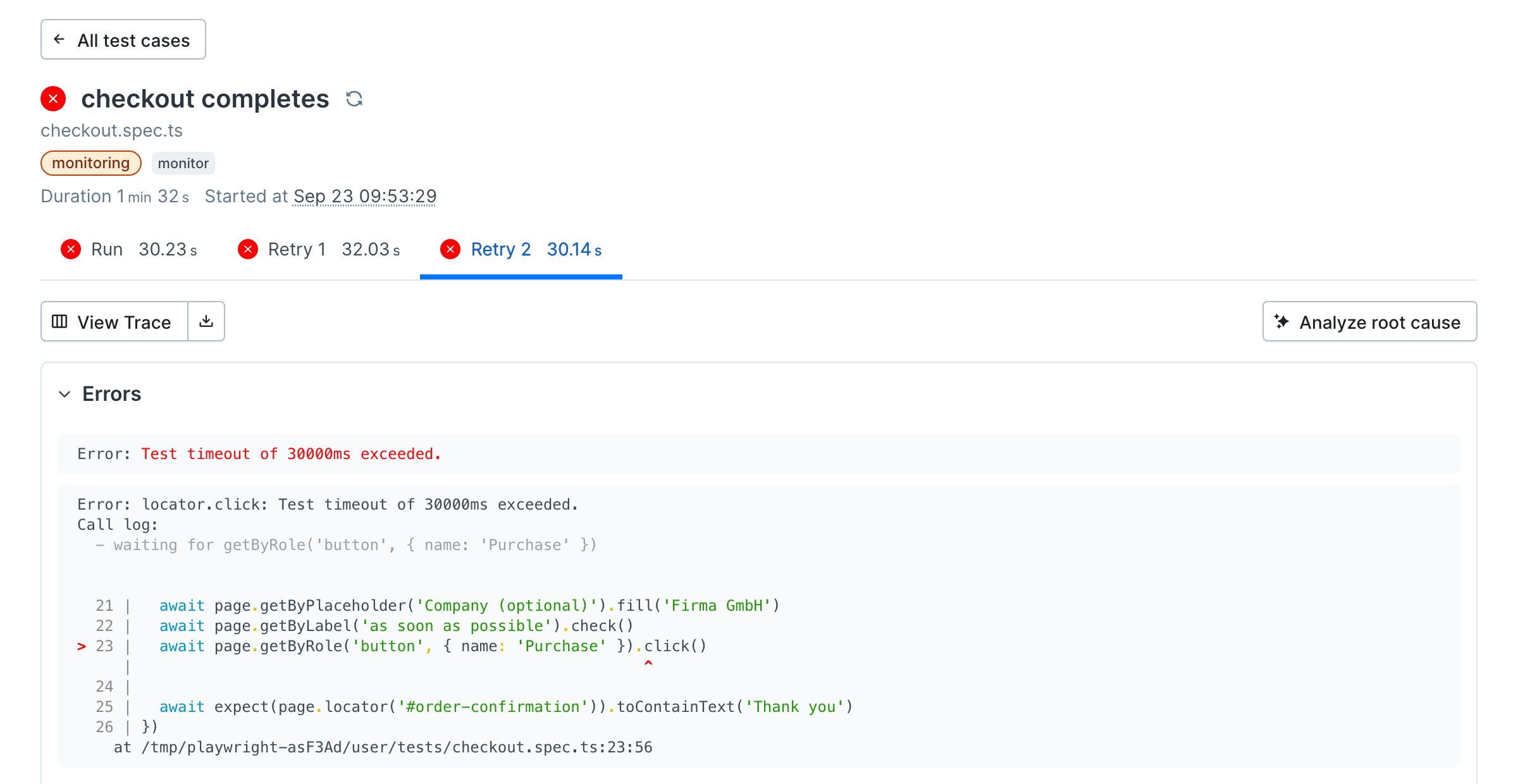
Playwright retried the test twice, the search test still passed, and `maxFailures` stopped the run. The result page shows the failing step, the error, a screenshot at the moment of failure, and the trace. This is the page an alert links to.
Put `Buy` back. The deployed monitor never saw the broken version, because `npx checkly test` runs the code in your working tree and `npx checkly deploy` is what changes the monitor.
`--grep` matches the check's `name`, not its `logicalId`.
## Next
[Cover every endpoint with uptime monitors](/guides/uptime-monitoring): add URL, heartbeat, and SSL monitors around the flows you just covered, from a few lines of code.
## Reference
* [Playwright Check Suites overview](/detect/synthetic-monitoring/playwright-checks/overview)
* [Playwright Check Suite configuration](/detect/synthetic-monitoring/playwright-checks/configuration)
* [Organize your tests and monitors](/detect/synthetic-monitoring/playwright-checks/test-organization)
* [Playwright Check Suite environment variables](/detect/synthetic-monitoring/playwright-checks/environment-variables)
* [`PlaywrightCheck` construct](/constructs/playwright-check)
* [`BrowserCheck` construct](/constructs/browser-check)
* [`npx checkly test`](/cli/checkly-test) and [`npx checkly deploy`](/cli/checkly-deploy)
* [Checkly Skills](/ai/skills)
 No Playwright project handy? Clone the [sample project](https://github.com/checkly/docs/tree/main/samples/guides/playwright-to-monitoring) this guide is built on. It runs against the [Danube demo shop](https://danube-web.shop).
 ## Step 4: Deploy
```bash Terminal theme={null}
npx checkly deploy
```
```text Terminal theme={null}
Parsing your project... ✅
Validating project resources... ✅
Bundling project resources... ✅
Uploading Playwright tests... ✅
Deploying project... ✅
Successfully deployed project "Docs guide: Playwright tests to monitors" to account "Checkly Marketing".
```
The suite now runs on its schedule. The first run starts immediately with `CHECKLY_RUN_SOURCE=CLI_DEPLOY`, then every ten minutes from both locations. It appears in your check list as a Playwright check.
## Step 4: Deploy
```bash Terminal theme={null}
npx checkly deploy
```
```text Terminal theme={null}
Parsing your project... ✅
Validating project resources... ✅
Bundling project resources... ✅
Uploading Playwright tests... ✅
Deploying project... ✅
Successfully deployed project "Docs guide: Playwright tests to monitors" to account "Checkly Marketing".
```
The suite now runs on its schedule. The first run starts immediately with `CHECKLY_RUN_SOURCE=CLI_DEPLOY`, then every ten minutes from both locations. It appears in your check list as a Playwright check.
 Every later `npx checkly deploy` updates the suite in place, so the monitor changes whenever the tests do. Wire that into CI and the tests and the monitors ship together.
## Verify it works
Break the checkout on purpose before production does. Rename the `Buy` button in the spec to `Purchase` and run the suite again, without deploying.
```bash Terminal theme={null}
npx checkly test --record --grep "Shop critical flows"
```
```text Terminal theme={null}
Running 1 checks in eu-west-1.
playwright.config.ts
✖ Shop critical flows (101s)
09:53:59 ERROR Error: locator.click: Test timeout of 30000ms exceeded.
Call log:
- waiting for getByRole('button', { name: 'Purchase' })
at tests/checkout.spec.ts:23:56
09:55:04 INFO 1 ✘ [monitoring] checkout.spec.ts > checkout completes
09:55:04 INFO 2 ✓ [monitoring] search.spec.ts > search finds a book
09:55:04 ERROR Testing stopped early after 1 maximum allowed failures.
View result: https://chkly.link/l/_rONl
1 failed, 1 total
```
Playwright retried the test twice, the search test still passed, and `maxFailures` stopped the run. The result page shows the failing step, the error, a screenshot at the moment of failure, and the trace. This is the page an alert links to.
Every later `npx checkly deploy` updates the suite in place, so the monitor changes whenever the tests do. Wire that into CI and the tests and the monitors ship together.
## Verify it works
Break the checkout on purpose before production does. Rename the `Buy` button in the spec to `Purchase` and run the suite again, without deploying.
```bash Terminal theme={null}
npx checkly test --record --grep "Shop critical flows"
```
```text Terminal theme={null}
Running 1 checks in eu-west-1.
playwright.config.ts
✖ Shop critical flows (101s)
09:53:59 ERROR Error: locator.click: Test timeout of 30000ms exceeded.
Call log:
- waiting for getByRole('button', { name: 'Purchase' })
at tests/checkout.spec.ts:23:56
09:55:04 INFO 1 ✘ [monitoring] checkout.spec.ts > checkout completes
09:55:04 INFO 2 ✓ [monitoring] search.spec.ts > search finds a book
09:55:04 ERROR Testing stopped early after 1 maximum allowed failures.
View result: https://chkly.link/l/_rONl
1 failed, 1 total
```
Playwright retried the test twice, the search test still passed, and `maxFailures` stopped the run. The result page shows the failing step, the error, a screenshot at the moment of failure, and the trace. This is the page an alert links to.
 Put `Buy` back. The deployed monitor never saw the broken version, because `npx checkly test` runs the code in your working tree and `npx checkly deploy` is what changes the monitor.