> ## Documentation Index
> Fetch the complete documentation index at: https://checkly-422f444a-onboarding-guides-plan.mintlify.site/llms.txt
> Use this file to discover all available pages before exploring further.

# Monitor a checkout flow

> Cover browse, search, add to cart, and checkout on a shop with a Playwright Check Suite that asserts the order confirmation, uses safe test data, and runs against a per-environment base URL.

export const CopyPromptButton = ({label = "Copy setup prompt", targetId = "ai-setup-prompt"}) => {
  const [copied, setCopied] = useState(false);
  const handleCopy = async () => {
    try {
      const el = document.getElementById(targetId);
      const code = el?.querySelector("code");
      const text = code?.textContent || el?.textContent || "";
      await navigator.clipboard.writeText(text);
      setCopied(true);
      setTimeout(() => setCopied(false), 2000);
    } catch (err) {
      console.error("Failed to copy prompt:", err);
    }
  };
  return <button onClick={handleCopy} className="inline-flex items-center gap-2 px-5 py-3 rounded-lg font-semibold text-base
        border border-gray-200 dark:border-gray-700
        bg-white dark:bg-gray-800
        text-gray-800 dark:text-gray-200
        hover:bg-gray-50 dark:hover:bg-gray-700
        transition-colors cursor-pointer my-2">
      {copied ? <>
          <svg width="18" height="18" viewBox="0 0 16 16" fill="none">
            <path d="M13.3 4.3L6 11.6L2.7 8.3" stroke="currentColor" strokeWidth="2" strokeLinecap="round" strokeLinejoin="round" />
          </svg>
          Copied!
        </> : <>
          <svg width="18" height="18" viewBox="0 0 16 16" fill="none">
            <rect x="5" y="5" width="9" height="9" rx="1.5" stroke="currentColor" strokeWidth="1.5" />
            <path d="M11 5V3.5C11 2.67 10.33 2 9.5 2H3.5C2.67 2 2 2.67 2 3.5V9.5C2 10.33 2.67 11 3.5 11H5" stroke="currentColor" strokeWidth="1.5" />
          </svg>
          {label}
        </>}
    </button>;
};

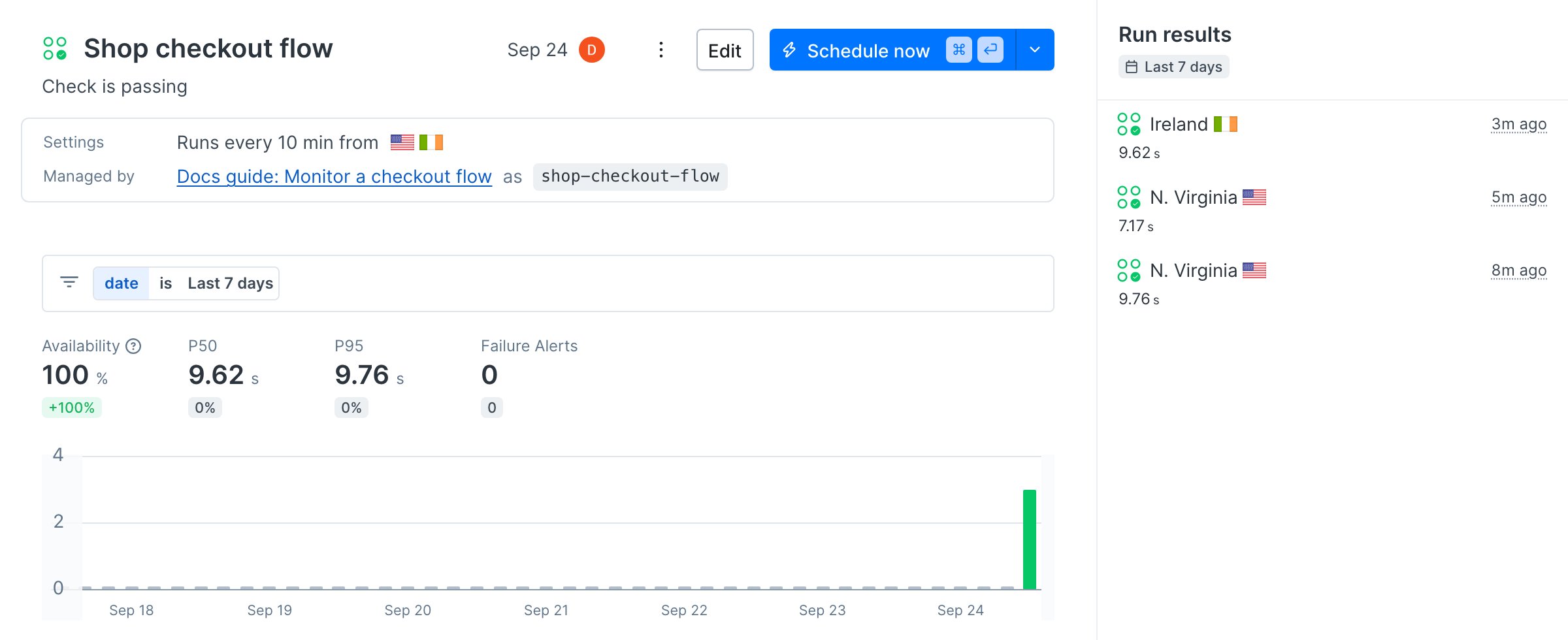
By the end of this guide, four Playwright tests cover the path from the shop's home page to a confirmed order, run every ten minutes from two regions, and fail if the confirmation text is missing.

<Frame>
  <img src="https://mintcdn.com/checkly-422f444a-onboarding-guides-plan/nD0nUTHFapTttRPh/images/guides/checkout-flow/outcome-check-detail.png?fit=max&auto=format&n=nD0nUTHFapTttRPh&q=85&s=32b9eadf8e5a2c7de0ddc573e8d653b5" alt="The Shop checkout flow Playwright Check Suite in Checkly, passing, running every 10 minutes from N. Virginia and Ireland" width="2400" height="980" data-path="images/guides/checkout-flow/outcome-check-detail.png" />
</Frame>

The [sample project](https://github.com/checkly/docs/tree/main/samples/guides/checkout-flow) this guide is built on runs against the [Danube demo shop](https://danube-web.shop) and includes the Terraform variant.

<Accordion title="Let your agent do it" icon="sparkles">
  To run this guide from your terminal or your coding agent, run `npx checkly init` in your project first. It installs the Checkly CLI and [Checkly Skills](/ai/skills) for your agent. Then paste the prompt below into Claude Code, Cursor, Codex, or any agent that supports skills. It builds the same setup as this guide, proves it with `npx checkly test --record`, and stops for your confirmation before `npx checkly deploy`.

  <div id="ai-setup-prompt">
    ```txt Prompt theme={null}
    Monitor the checkout flow of this shop with Checkly.

    Goal: a Playwright Check Suite with one test per step, browse, search, add to cart, and checkout, running every 10 minutes from us-east-1 and eu-west-1.

    Success criteria:
    1. Four spec files under `tests/`, one per step. The checkout test asserts the order confirmation text with `expect(page.getByText(...)).toBeVisible()`, not just that a page loaded.
    2. All order data comes from one shared `tests/shopper.ts` with a marker in a free-text field that our order pipeline can filter out. Never create accounts or use real customer data.
    3. `playwright.config.ts` reads `baseURL` from `SHOP_URL` and falls back to the local dev server. Set `screenshot: 'only-on-failure'` and `trace: 'retain-on-failure'`.
    4. `checkly.config.ts` defines one entry in `playwrightChecks` that sets `SHOP_URL` to production in `environmentVariables`.
    5. Run `npx checkly test --record` and show me the session link.
    6. Stop. Show me `npx checkly deploy --preview` and wait for my confirmation before `npx checkly deploy`.

    Explain each file you changed and why.
    ```
  </div>

  <CopyPromptButton />

  Every step below is what the agent just did, in the open, so you can read the result or do it by hand.
</Accordion>

## Step 1: Write one test per step of the flow

A monitor that only runs the checkout tells you it broke, not where. Split the flow into the steps a shopper takes, so a failure names the step.
<CodeGroup>
  ```ts tests/browse.spec.ts theme={null}
  import { test, expect } from '@playwright/test'

  test('browse to a product', async ({ page }) => {
    await page.goto('/')

    await expect(page.locator('.preview').first()).toBeVisible()
    await page.locator('.preview:nth-child(1) > .preview-author').click()

    await expect(page.getByRole('button', { name: 'Add to cart' })).toBeVisible()
  })
  ```

  ```ts tests/search.spec.ts theme={null}
  import { test, expect } from '@playwright/test'

  test('search finds a book', async ({ page }) => {
    await page.goto('/')

    await page.locator('input[name="searchbar"]').fill('haben')
    await page.getByRole('button', { name: 'Search' }).click()

    await expect(page.locator('.preview').first()).toContainText('Haben oder haben')
  })
  ```

  ```ts tests/cart.spec.ts theme={null}
  import { test, expect } from '@playwright/test'

  test('add to cart', async ({ page }) => {
    await page.goto('/')

    await page.locator('.preview:nth-child(1) > .preview-author').click()
    const title = await page.locator('.detail-wrapper h2').innerText()
    await page.getByRole('button', { name: 'Add to cart' }).click()
    await page.locator('#logo').click()

    await page.locator('#cart').click()
    await expect(page.locator('.cart')).toContainText(title)
  })
  ```
</CodeGroup>

The checkout test places an order from one shared identity, so every monitoring order looks the same to your backend.

```ts tests/shopper.ts theme={null}
// One synthetic identity for every monitoring order. The company field
// carries a marker your order pipeline can filter out of real sales.
export const shopper = {
  name: 'Checkly',
  surname: 'Monitor',
  address: 'Charlottenstr. 57',
  zipcode: '10117',
  city: 'Berlin',
  company: 'synthetic-monitoring',
}
```

```ts tests/checkout.spec.ts theme={null}
import { test, expect } from '@playwright/test'
import { shopper } from './shopper'

test('checkout completes', async ({ page }) => {
  await page.goto('/')

  await page.locator('.preview:nth-child(1) > .preview-author').click()
  await page.getByRole('button', { name: 'Add to cart' }).click()
  await page.locator('#logo').click()

  await page.locator('#cart').click()
  await page.getByRole('button', { name: 'Checkout' }).click()

  await page.getByPlaceholder('Name', { exact: true }).fill(shopper.name)
  await page.getByPlaceholder('Surname', { exact: true }).fill(shopper.surname)
  await page.getByPlaceholder('Address').fill(shopper.address)
  await page.getByPlaceholder('Zipcode').fill(shopper.zipcode)
  await page.getByPlaceholder('City').fill(shopper.city)
  await page.getByPlaceholder('Company (optional)').fill(shopper.company)
  await page.getByLabel('as soon as possible').check()
  await page.getByRole('button', { name: 'Buy' }).click()

  // A page that loads is not a page that worked. Assert the confirmation text.
  await expect(page.getByText('All good, order is on the way. Thank you!!')).toBeVisible()
})
```

Every ten minutes, from two regions, this places an order. Decide up front how those orders stay out of your numbers: a marker in a free-text field like the company above, a test SKU, a test payment method, or a flag that skips fulfilment for a known customer. Never sign up accounts from a monitor, and never use a real customer's data.

<Tip>
  On the demo shop, the "Company (optional)" field has to be filled or the Buy button does nothing. Run your own flow by hand once and note every required field.
</Tip>

## Step 2: Assert the confirmation text, not the page

The last line of the checkout test is the whole point of the monitor. A rendered page proves nothing about the order. The confirmation text does. `getByText` matches anywhere on the page, case-insensitive, substring included, which suits anything a customer has to see: an order number, a "thank you" message, a best seller on the home page.

```ts tests/checkout.spec.ts theme={null}
  await expect(page.getByText('All good, order is on the way. Thank you!!')).toBeVisible()
```

When the wording varies, pass a regular expression such as `/order (is on the way|confirmed)/i`. When the text can appear more than once, add `.first()`.

## Step 3: Point the tests at each environment

Keep the shop's address out of the tests. The Playwright config reads it from `SHOP_URL` and falls back to your dev server, so the same specs run locally, against staging in CI, and against production on Checkly.

```ts playwright.config.ts theme={null}
import { defineConfig, devices } from '@playwright/test'

export default defineConfig({
  testDir: './tests',
  retries: process.env.CHECKLY === '1' ? 2 : 0,
  use: {
    // SHOP_URL is set per environment: on the Checkly check for production,
    // in your shell or CI for staging. Local runs fall back to the dev server.
    baseURL: process.env.SHOP_URL ?? 'http://localhost:3000',
    trace: 'retain-on-failure',
    screenshot: 'only-on-failure',
    ...devices['Desktop Chrome'],
  },
})
```

`screenshot: 'only-on-failure'` is what puts a screenshot on the failed result in Checkly. Checkly records a trace on every run regardless of the `trace` setting, and sets `CHECKLY=1` on every run, which is what turns on the retries here. To run locally against the demo shop, prefix the command with `SHOP_URL=https://danube-web.shop`.

## Step 4: Define the monitor

Install the CLI if this repository does not have it yet, then describe the monitor next to your Playwright config. A Playwright Check Suite runs the whole suite with your config and shows one test case per spec. A Browser Check runs a single spec file on its own. Pick one.

```bash Terminal theme={null}
npm install --save-dev checkly
```

<CodeGroup>
  ```ts checkly.config.ts (Playwright Check Suite) theme={null}
  import { defineConfig } from 'checkly'
  import { Frequency } from 'checkly/constructs'

  export default defineConfig({
    projectName: 'Docs guide: Monitor a checkout flow',
    logicalId: 'docs-guide-checkout-flow',
    checks: {
      playwrightConfigPath: './playwright.config.ts',
      playwrightChecks: [
        {
          name: 'Shop checkout flow',
          logicalId: 'shop-checkout-flow',
          frequency: Frequency.EVERY_10M,
          locations: ['us-east-1', 'eu-west-1'],
          // The production base URL lives on the check, not in the tests.
          // Point a second check at staging by changing only this value.
          environmentVariables: [
            { key: 'SHOP_URL', value: 'https://danube-web.shop' },
          ],
        },
      ],
    },
    cli: {
      runLocation: 'eu-west-1',
    },
  })
  ```

  ```ts checks/checkout.check.ts (Browser Check) theme={null}
  import { BrowserCheck, Frequency } from 'checkly/constructs'
  import * as path from 'path'

  // The single-file alternative: one spec file becomes one Browser Check.
  // Browser Checks run the file on its own, without playwright.config.ts,
  // so the spec reads SHOP_URL itself instead of relying on baseURL.
  new BrowserCheck('shop-checkout-browser-check', {
    name: 'Shop checkout (Browser Check)',
    frequency: Frequency.EVERY_10M,
    locations: ['us-east-1', 'eu-west-1'],
    environmentVariables: [
      { key: 'SHOP_URL', value: 'https://danube-web.shop' },
    ],
    code: {
      entrypoint: path.join(__dirname, 'checkout.spec.ts'),
    },
  })
  ```
</CodeGroup>

The base URL is a check-level environment variable in both paths. A staging monitor is the same entry with a different `SHOP_URL`, and the tests never change. The Browser Check path needs a copy of the checkout spec that opens `process.env.SHOP_URL` itself, kept in `checks/checkout.spec.ts` in the sample.

## Step 5: Run it on Checkly, then deploy

`npx checkly test` bundles the project, runs it on Checkly's infrastructure, and streams the result back. `--record` keeps the run so you can open it in the app.

```bash Terminal theme={null}
npx checkly test --record
```

```text Terminal theme={null}
Parsing your project... ✅
Validating project resources... ✅
Bundling project resources... ✅
Uploading Playwright tests... ✅

Test session ID: 01a0d48f-d7df-70dd-852d-ee314453c954
Open session: https://app.checklyhq.com/accounts/<account-id>/test-sessions/01a0d48f-d7df-70dd-852d-ee314453c954

Running 2 checks in eu-west-1.

checks/checkout.check.ts
  ✔ Shop checkout (Browser Check) (4s)
playwright.config.ts
  ✔ Shop checkout flow (30s)

2 passed, 2 total
```

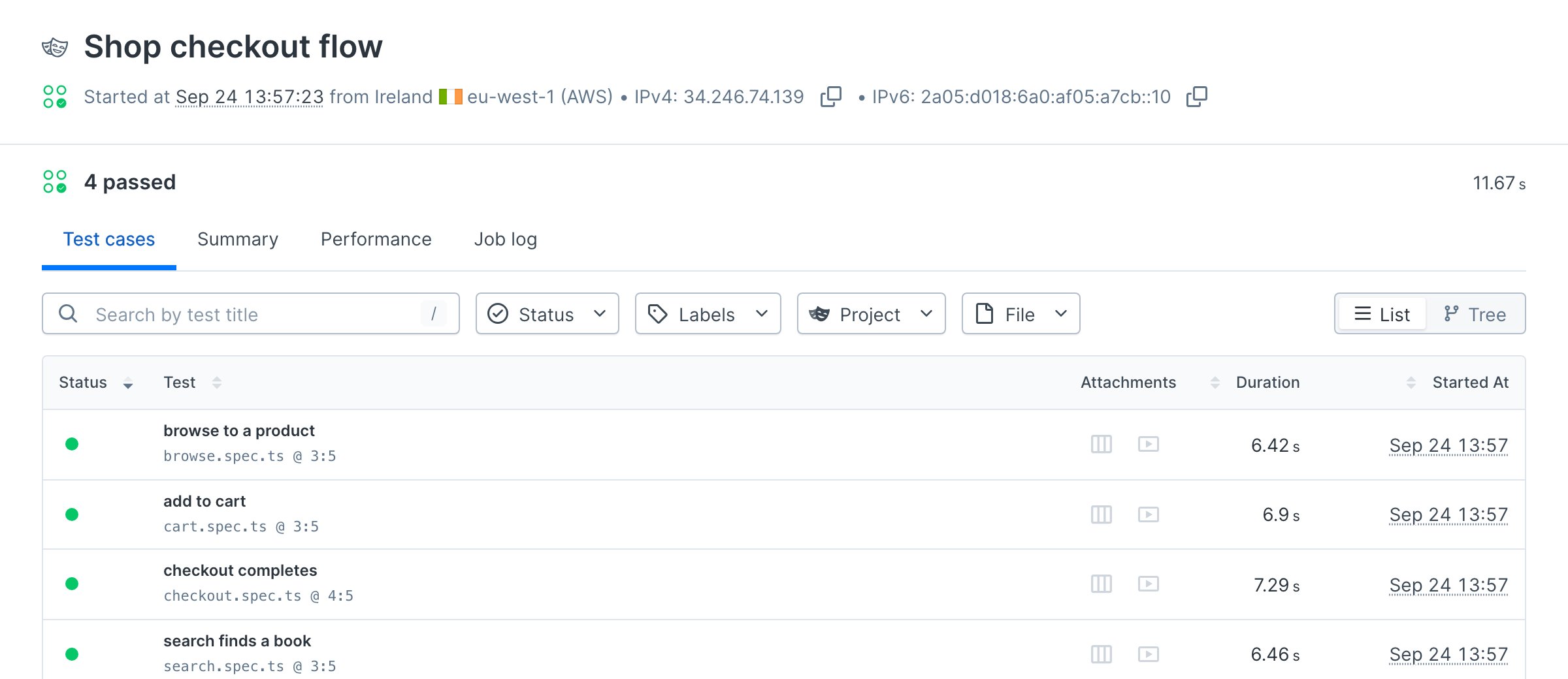
Both variants ran because the sample contains both. The suite result lists the four test cases, each with a trace and video.

<Frame>
  <img src="https://mintcdn.com/checkly-422f444a-onboarding-guides-plan/nD0nUTHFapTttRPh/images/guides/checkout-flow/result-passing.png?fit=max&auto=format&n=nD0nUTHFapTttRPh&q=85&s=0b5eb3181844398175040e04afb31245" alt="A passing Shop checkout flow result in Checkly listing the browse, add to cart, checkout, and search test cases with trace and video attachments" width="2400" height="1040" data-path="images/guides/checkout-flow/result-passing.png" />
</Frame>

When the run is green, deploy.

```bash Terminal theme={null}
npx checkly deploy
```

```text Terminal theme={null}
Deploying project... ✅

Successfully deployed project "Docs guide: Monitor a checkout flow" to account "Checkly Marketing".
```

The suite now runs every ten minutes from both locations, and every later deploy updates it in place.

## Same thing in Terraform

If your team manages infrastructure with Terraform, the checkout flow is one `checkly_check` resource: a Browser Check with the self-contained spec and the same `SHOP_URL` variable.

```terraform terraform/main.tf theme={null}
# Provider block as in the Terraform overview, then:
resource "checkly_check" "shop_checkout" {
  name                      = "Shop checkout (Terraform)"
  type                      = "BROWSER"
  activated                 = true
  frequency                 = 10
  use_global_alert_settings = true
  run_parallel              = true

  locations = [
    "us-east-1",
    "eu-west-1"
  ]

  retry_strategy {
    type = "LINEAR"
  }

  environment_variable {
    key   = "SHOP_URL"
    value = "https://danube-web.shop"
  }

  script = file("${path.module}/../checks/checkout.spec.ts")
}
```

Set `TF_VAR_checkly_api_key` and `TF_VAR_checkly_account_id`, then run `terraform init` and `terraform plan`.

```text Terminal theme={null}
Terraform will perform the following actions:

  # checkly_check.shop_checkout will be created
  + resource "checkly_check" "shop_checkout" {
      + frequency                 = 10
      + locations                 = [
          + "eu-west-1",
          + "us-east-1",
        ]
      + name                      = "Shop checkout (Terraform)"
      + type                      = "BROWSER"

      + environment_variable {
          + key    = "SHOP_URL"
          + value  = "https://danube-web.shop"
        }
    }

Plan: 1 to add, 0 to change, 0 to destroy.
```

`terraform apply` creates the check. The provider also has a `checkly_playwright_check_suite` resource for the four-test split from step 1; see the [Terraform provider docs](/integrations/iac/terraform/overview).

## Verify it works

Break the checkout on purpose before production does. Rename the `Buy` button in `tests/checkout.spec.ts` to `Purchase` and run the suite again, without deploying.

```bash Terminal theme={null}
npx checkly test --record --grep "Shop checkout flow"
```

```text Terminal theme={null}
Running 1 checks in eu-west-1.

playwright.config.ts
  ✖ Shop checkout flow (105s)

    14:03:58 INFO  Running 4 tests using 4 workers
    14:04:01 INFO  1 ✓ browse.spec.ts > browse to a product
    14:04:02 INFO  2 ✓ cart.spec.ts > add to cart
    14:04:02 INFO  3 ✓ search.spec.ts > search finds a book
    14:04:30 ERROR Error: locator.click: Test timeout of 30000ms exceeded.
    Call log:
      - waiting for getByRole('button', { name: 'Purchase' })

        at tests/checkout.spec.ts:21:56
    14:05:35 INFO  4 ✘ checkout.spec.ts > checkout completes

    View result: https://chkly.link/l/3GNVN

1 failed, 1 total
```

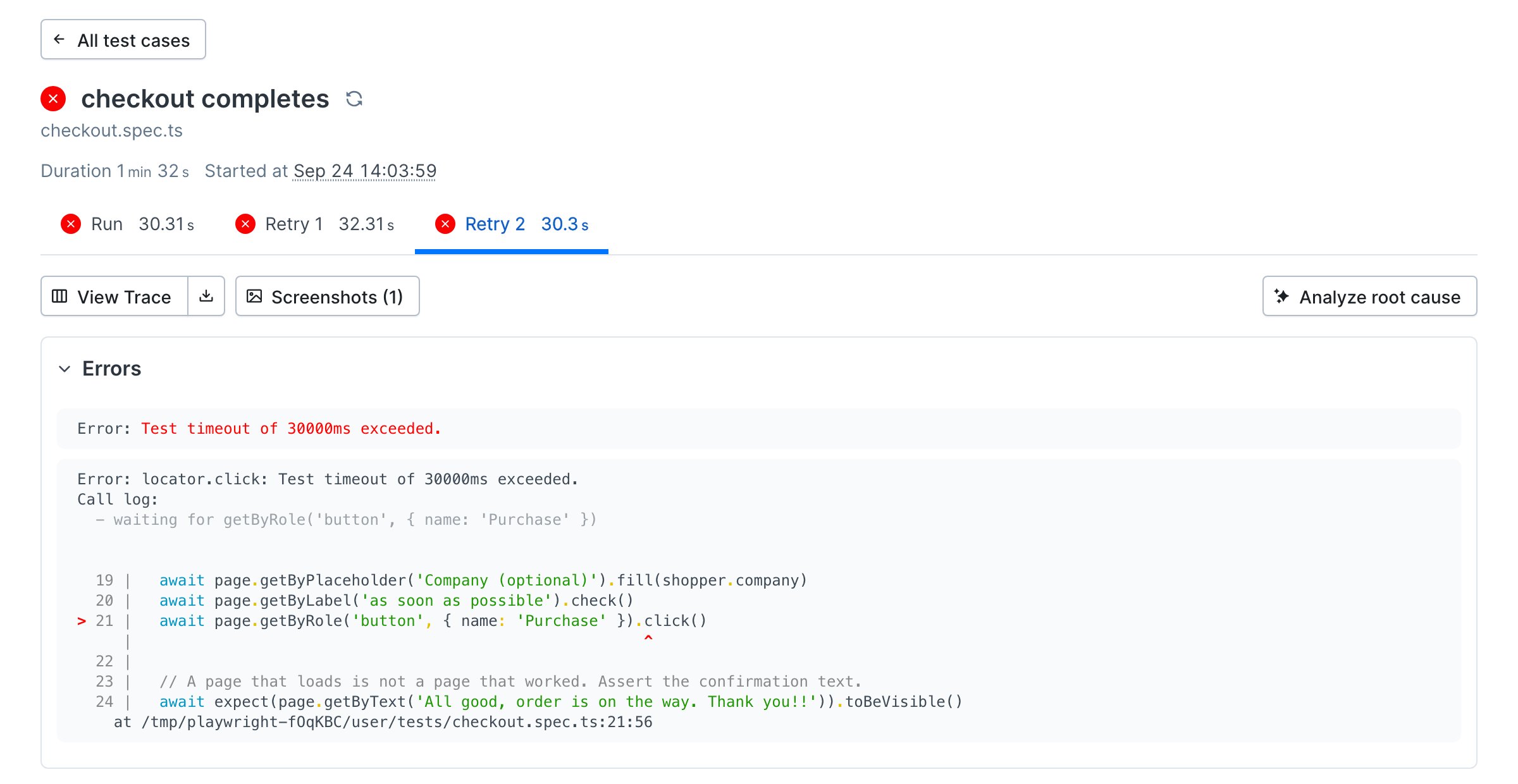
Browse, search, and add to cart still passed, so the failure is scoped to checkout before anyone opens a trace. The result page shows the failing line, the error, a screenshot at the moment of failure, and the trace.
<Frame>
  <img src="https://mintcdn.com/checkly-422f444a-onboarding-guides-plan/nD0nUTHFapTttRPh/images/guides/checkout-flow/result-failing.png?fit=max&auto=format&n=nD0nUTHFapTttRPh&q=85&s=e35a8c85eb25db778a232a88c30bd2cd" alt="The failed checkout test case in Checkly showing three failed attempts, the Playwright error with the Purchase button line highlighted, and the View Trace and Screenshots buttons" width="2400" height="1240" data-path="images/guides/checkout-flow/result-failing.png" />
</Frame>

Put `Buy` back. The deployed monitor never saw the broken version, because only `npx checkly deploy` changes the monitor.

<Note>
  `--grep` matches the check's `name`, not its `logicalId`.
</Note>

## Next

[Run checks on every deploy](/guides/sdlc-monitoring): run this suite from CI before a release ships and trigger it after the deploy, so a broken checkout never reaches the schedule.

## Reference

* [Playwright Check Suites overview](/detect/synthetic-monitoring/playwright-checks/overview)
* [Playwright Check Suite configuration](/detect/synthetic-monitoring/playwright-checks/configuration)
* [Playwright Check Suite environment variables](/detect/synthetic-monitoring/playwright-checks/environment-variables)
* [`PlaywrightCheck` construct](/constructs/playwright-check)
* [`BrowserCheck` construct](/constructs/browser-check)
* [Environment variables and secrets](/platform/variables)
* [Terraform provider](/integrations/iac/terraform/overview)
* [`npx checkly test`](/cli/checkly-test) and [`npx checkly deploy`](/cli/checkly-deploy)
* [Checkly Skills](/ai/skills)