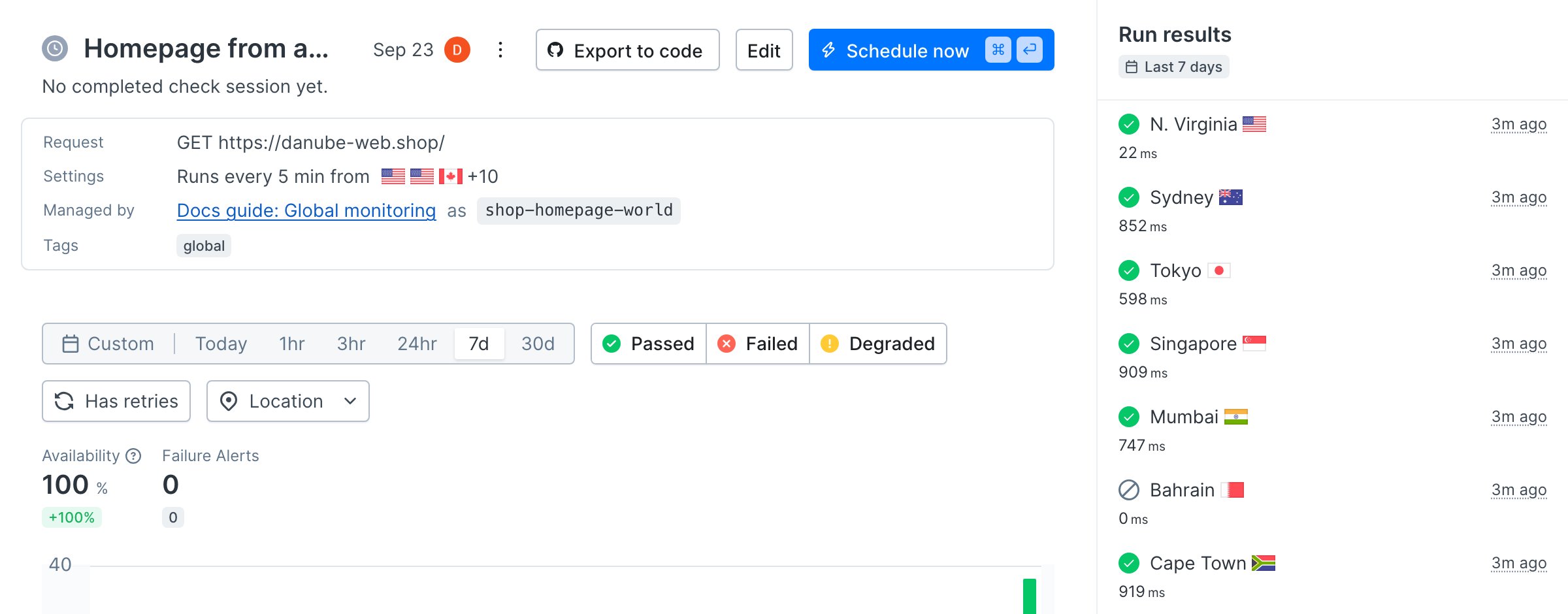
 To follow along without your own app, clone the [sample project](https://github.com/checkly/docs/tree/main/samples/guides/global-monitoring). It monitors the [Danube demo shop](https://danube-web.shop), which is hosted in AWS `us-east-1`. Every number in this guide was measured against it.
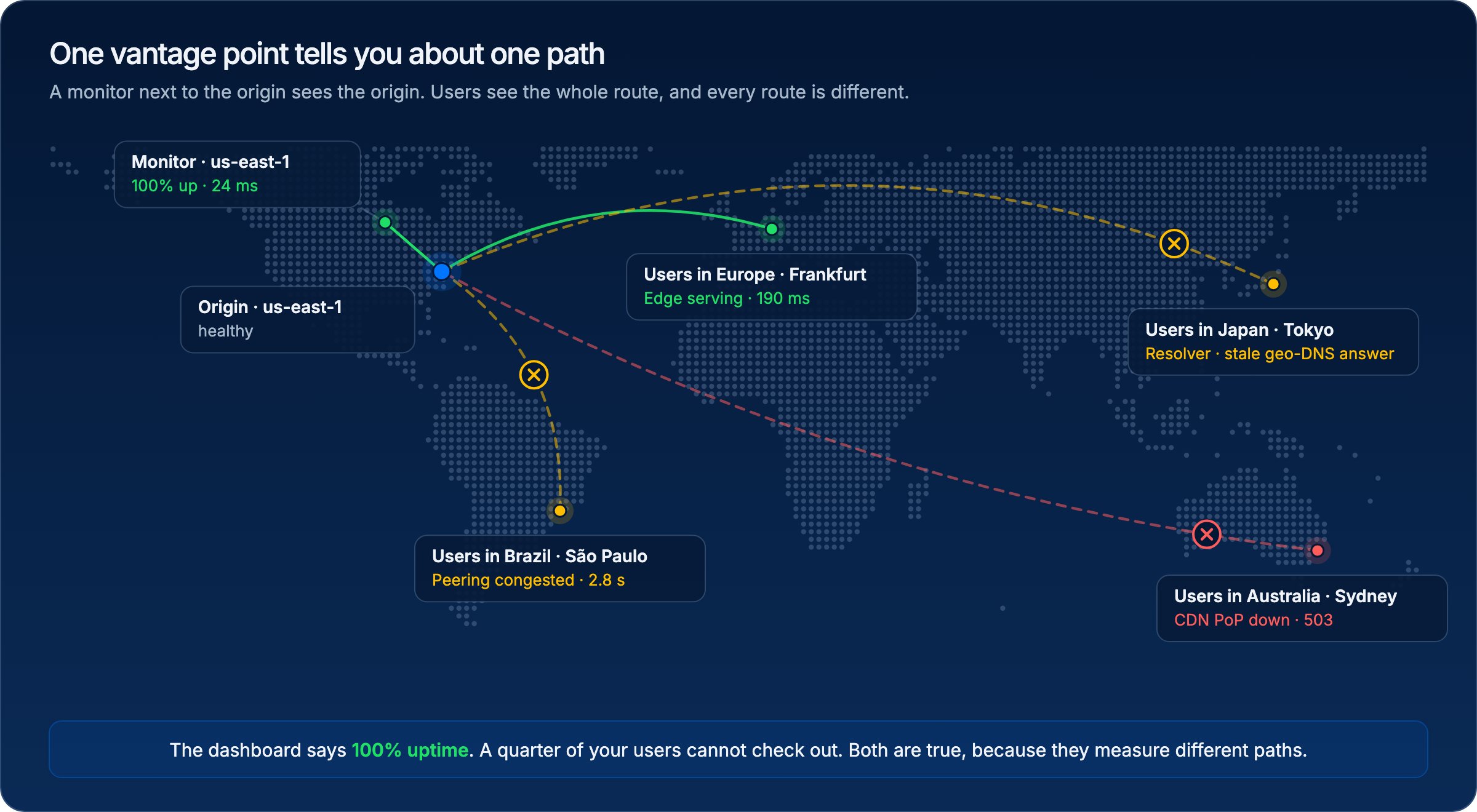 Between a browser and your code sit DNS, a CDN edge, transit networks, and a cloud region. Only the first hop is the same for everyone. The DNS answer, the edge that serves the request, the route it takes, and the region it lands in all depend on where the user is. Each of those hops can fail for one region and nobody else.
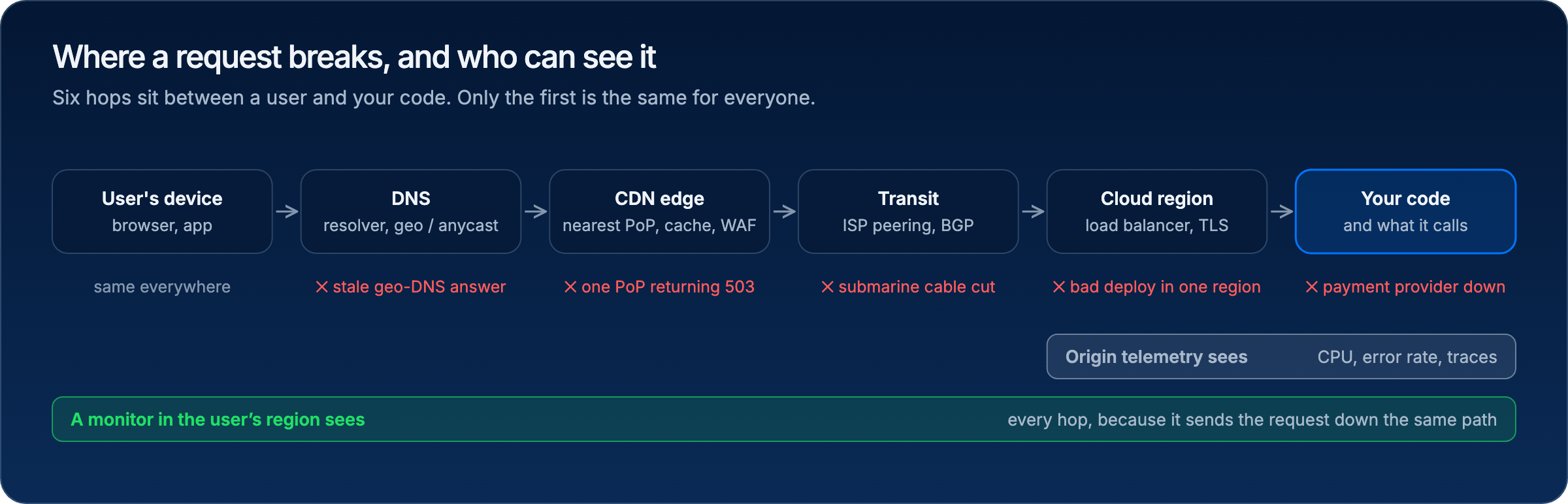 Origin-side telemetry, such as CPU, error rates, and traces, covers the last two hops. It cannot see a PoP returning 503s in Sydney, a WAF rule that blocks a country, or a submarine cable cut, because those requests never arrive. The only way to observe a path is to send a request down it.
### Latency is distance, and you pay it four times
Light in fibre covers roughly 200 kilometres per millisecond. Before the first byte of HTML arrives, a browser has already made about four round trips: DNS, TCP, TLS, and the HTTP request itself. Every one of them is priced by distance.
Origin-side telemetry, such as CPU, error rates, and traces, covers the last two hops. It cannot see a PoP returning 503s in Sydney, a WAF rule that blocks a country, or a submarine cable cut, because those requests never arrive. The only way to observe a path is to send a request down it.
### Latency is distance, and you pay it four times
Light in fibre covers roughly 200 kilometres per millisecond. Before the first byte of HTML arrives, a browser has already made about four round trips: DNS, TCP, TLS, and the HTTP request itself. Every one of them is priced by distance.
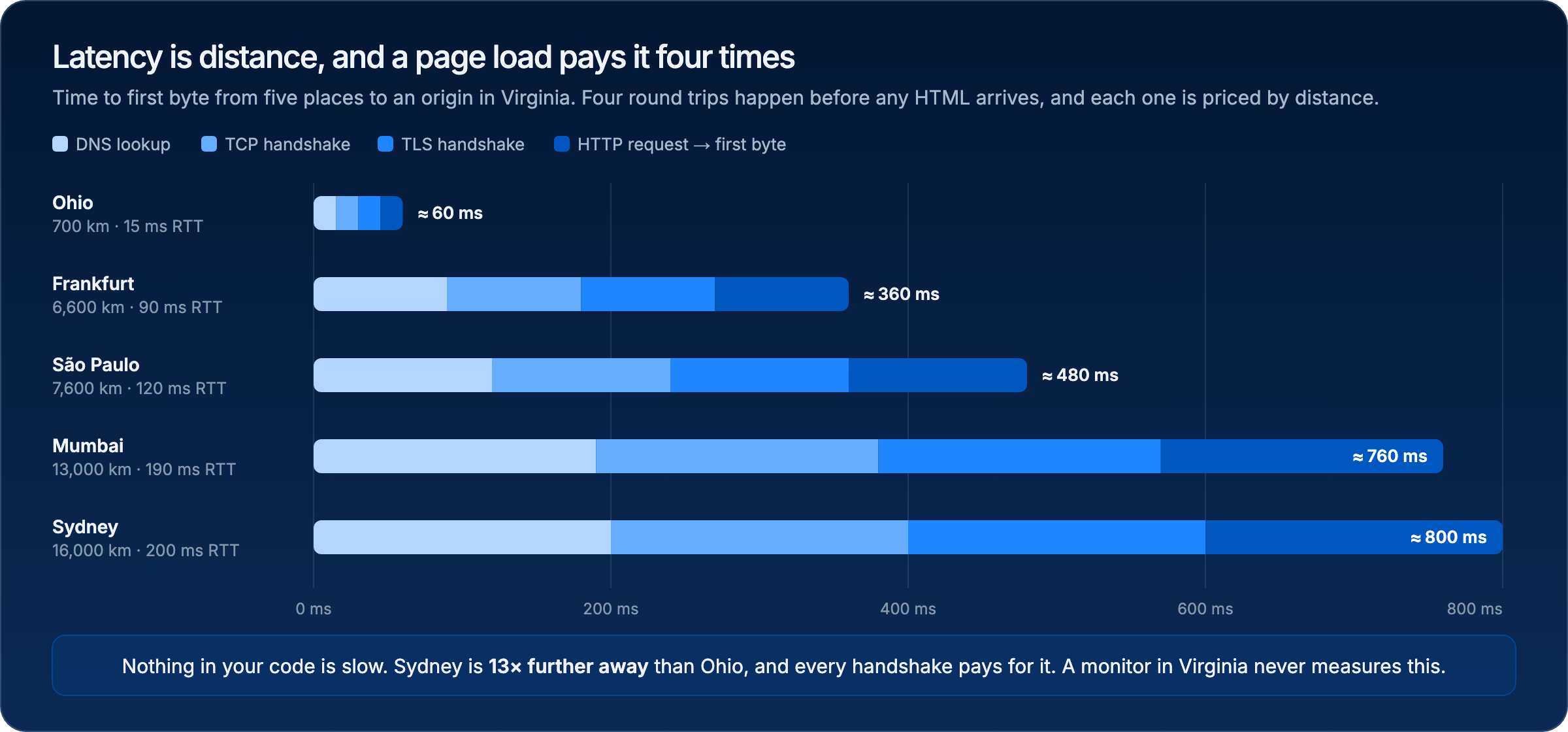 None of that shows up in your code's timing, because the code runs after the handshakes. A monitor in the origin region reports the fast case forever. A monitor in Mumbai reports what a customer in Mumbai gets.
## Build it in three steps
### Step 1: Measure from everywhere
Before you can choose locations, you need to know how your site behaves from each one. Put the locations in one file and treat it as configuration, not as a per-check afterthought.
```ts __checks__/locations.ts theme={null}
// Thirteen of the public Checkly locations, grouped by continent. Pick from here.
export const AMERICAS = ['us-east-1', 'us-west-2', 'ca-central-1', 'sa-east-1'] as const
export const EUROPE = ['eu-west-1', 'eu-central-1', 'eu-north-1'] as const
export const MIDDLE_EAST_AFRICA = ['me-south-1', 'af-south-1'] as const
export const ASIA_PACIFIC = ['ap-south-1', 'ap-southeast-1', 'ap-northeast-1', 'ap-southeast-2'] as const
export const WORLD = [...AMERICAS, ...EUROPE, ...MIDDLE_EAST_AFRICA, ...ASIA_PACIFIC]
```
A URL monitor is cheap enough to run from all of them.
```ts __checks__/homepage-world.check.ts highlight={9-10} theme={null}
import { Frequency, UrlAssertionBuilder, UrlMonitor } from 'checkly/constructs'
import { WORLD } from './locations'
// The same request from thirteen places at the same moment.
// Parallel scheduling is what turns "is it up?" into "is it up for whom?".
new UrlMonitor('shop-homepage-world', {
name: 'Homepage from around the world',
frequency: Frequency.EVERY_5M,
locations: [...WORLD],
runParallel: true,
degradedResponseTime: 1500,
maxResponseTime: 10000,
request: {
url: 'https://danube-web.shop/',
followRedirects: true,
assertions: [UrlAssertionBuilder.statusCode().equals(200)],
},
})
```
`runParallel` is the important line. Checkly schedules multi-location checks two ways. Round-robin runs one location per interval and rotates. Parallel runs every location every interval.
None of that shows up in your code's timing, because the code runs after the handshakes. A monitor in the origin region reports the fast case forever. A monitor in Mumbai reports what a customer in Mumbai gets.
## Build it in three steps
### Step 1: Measure from everywhere
Before you can choose locations, you need to know how your site behaves from each one. Put the locations in one file and treat it as configuration, not as a per-check afterthought.
```ts __checks__/locations.ts theme={null}
// Thirteen of the public Checkly locations, grouped by continent. Pick from here.
export const AMERICAS = ['us-east-1', 'us-west-2', 'ca-central-1', 'sa-east-1'] as const
export const EUROPE = ['eu-west-1', 'eu-central-1', 'eu-north-1'] as const
export const MIDDLE_EAST_AFRICA = ['me-south-1', 'af-south-1'] as const
export const ASIA_PACIFIC = ['ap-south-1', 'ap-southeast-1', 'ap-northeast-1', 'ap-southeast-2'] as const
export const WORLD = [...AMERICAS, ...EUROPE, ...MIDDLE_EAST_AFRICA, ...ASIA_PACIFIC]
```
A URL monitor is cheap enough to run from all of them.
```ts __checks__/homepage-world.check.ts highlight={9-10} theme={null}
import { Frequency, UrlAssertionBuilder, UrlMonitor } from 'checkly/constructs'
import { WORLD } from './locations'
// The same request from thirteen places at the same moment.
// Parallel scheduling is what turns "is it up?" into "is it up for whom?".
new UrlMonitor('shop-homepage-world', {
name: 'Homepage from around the world',
frequency: Frequency.EVERY_5M,
locations: [...WORLD],
runParallel: true,
degradedResponseTime: 1500,
maxResponseTime: 10000,
request: {
url: 'https://danube-web.shop/',
followRedirects: true,
assertions: [UrlAssertionBuilder.statusCode().equals(200)],
},
})
```
`runParallel` is the important line. Checkly schedules multi-location checks two ways. Round-robin runs one location per interval and rotates. Parallel runs every location every interval.
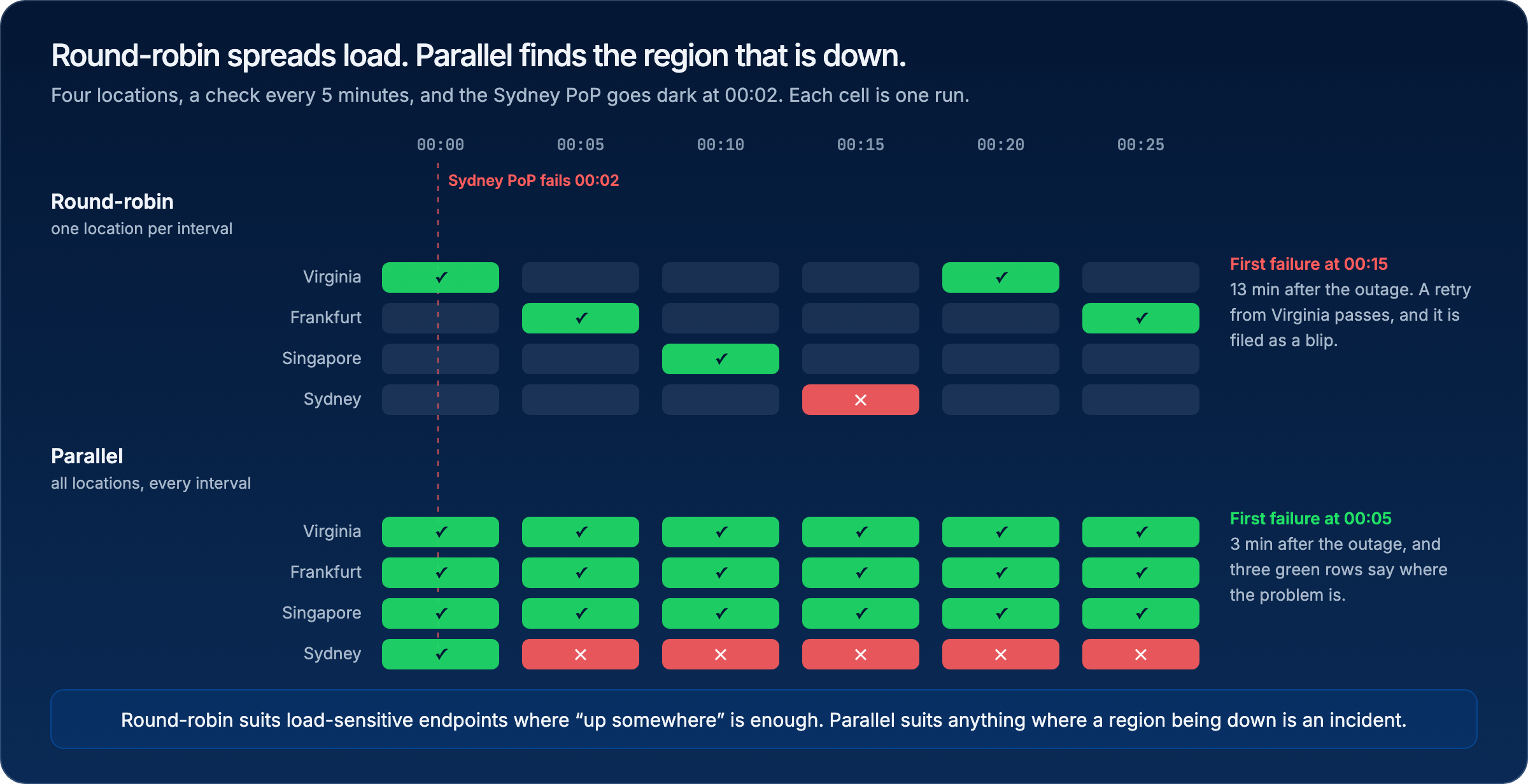 With four locations on a five-minute interval, round-robin takes up to fifteen minutes to run from the region that broke, and a retry from a different location then passes and hides it. Parallel catches it on the next tick and, because the other rows stay green, tells you it is regional. Round-robin still has a place: endpoints where the load of every location every minute is unwelcome and "up from somewhere" is the real requirement.
Deploy it and give it fifteen minutes. Then read the run results by location. This is what three parallel runs against the demo shop produced:
With four locations on a five-minute interval, round-robin takes up to fifteen minutes to run from the region that broke, and a retry from a different location then passes and hides it. Parallel catches it on the next tick and, because the other rows stay green, tells you it is regional. Round-robin still has a place: endpoints where the load of every location every minute is unwelcome and "up from somewhere" is the real requirement.
Deploy it and give it fifteen minutes. Then read the run results by location. This is what three parallel runs against the demo shop produced:
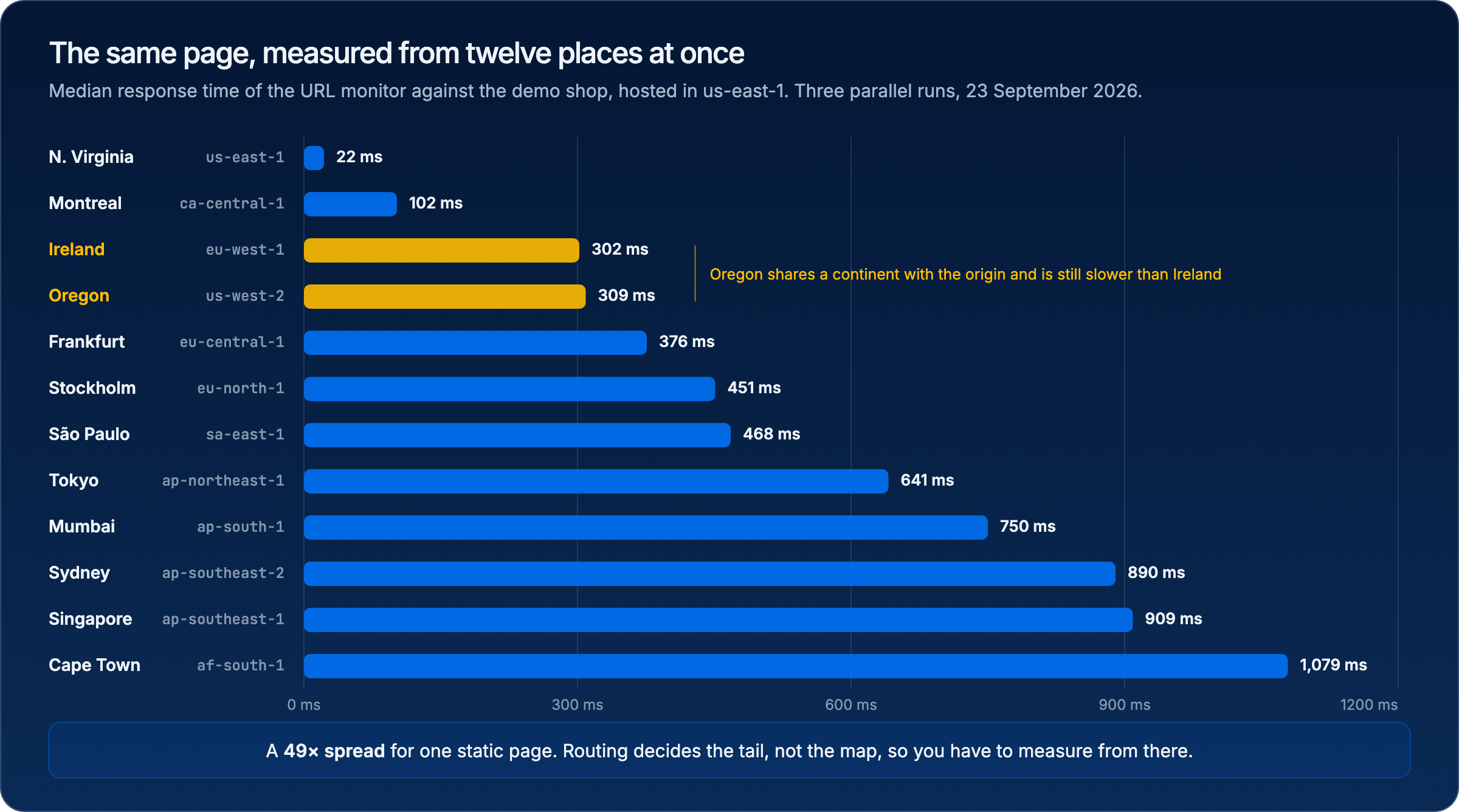 Two things in that chart matter more than the numbers. The spread is 49× for one static page, so a single "response time" for your site is not a real quantity. And Oregon is slower than Ireland despite sharing a continent with the origin, because routing decides the tail, not the map. You cannot reason your way to either fact. You have to measure from there.
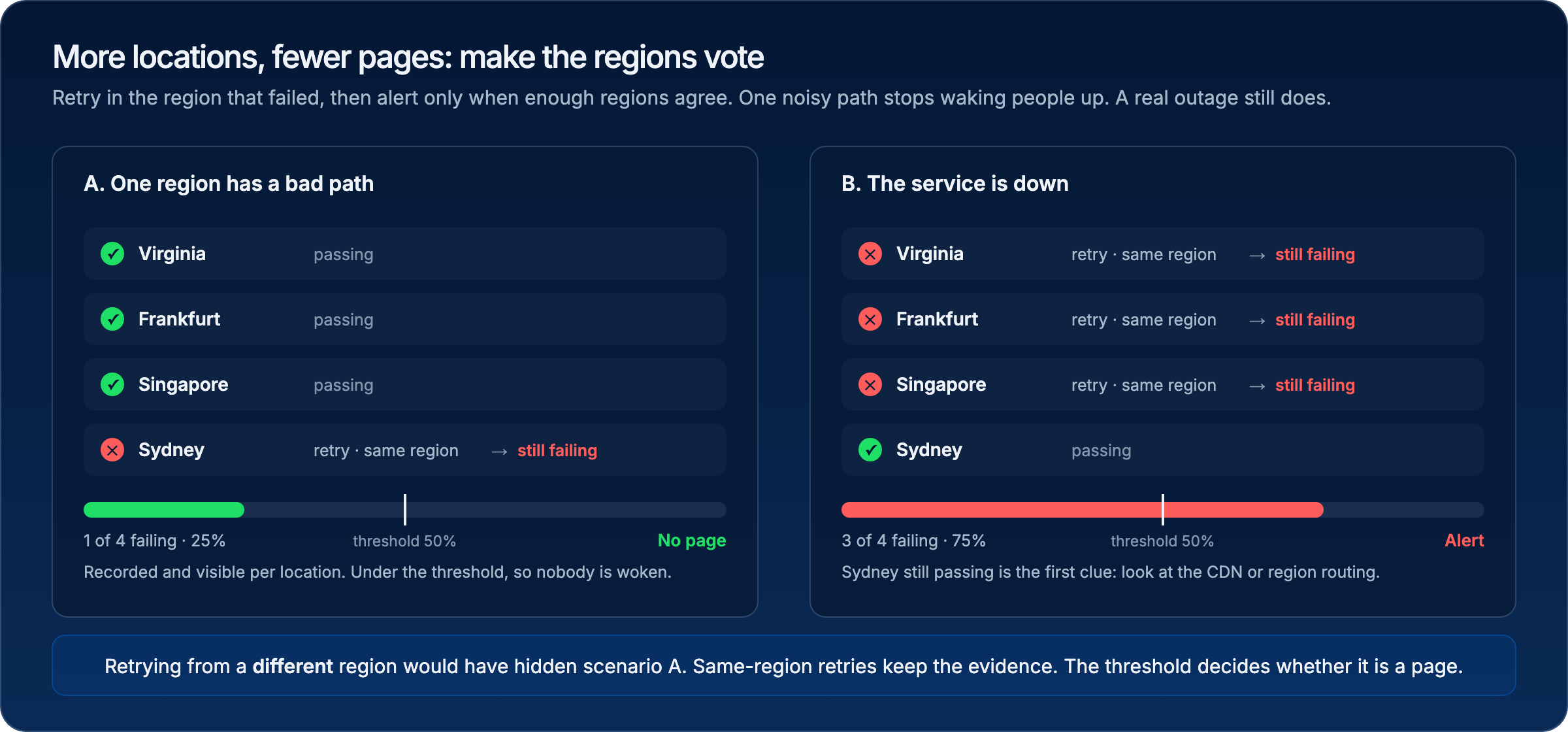 In scenario A one region fails, retries in place, and stays failed. That is real, it is recorded per location, and it is not a page, because 25% is under the threshold. In scenario B three regions fail and the alert fires. The region that still passes is the first clue about where to look. Retrying from a different region would have hidden scenario A entirely, which is the opposite of what you want from monitoring.
Use an odd number of locations on any check with a location-based threshold, so a 50% threshold never lands on a tie. With three, two agreeing regions page and one does not.
The full flow, from bundling to a passing run in every location:
```bash Terminal theme={null}
npx checkly test --record
```
```text Terminal theme={null}
Running 2 checks in eu-west-1.
__checks__/checkout-regions.check.ts
✔ Checkout from three continents (33s)
__checks__/homepage-world.check.ts
✔ Homepage from around the world (234ms)
2 passed, 2 total
```
```bash Terminal theme={null}
npx checkly deploy
```
## Verify it works
With the [Checkly MCP server](/ai/mcp-server) connected, the same read is one prompt away, and it is the kind of question you will ask again after every deploy:
```text Prompt theme={null}
Using Checkly, show the latest results of "Homepage from around the world" grouped by location, sorted by response time. Which three locations are slowest, and is any location above the degraded threshold?
```
Open the world monitor and sort its run results by location. The order should match the chart above within a few positions, and every location should be under the `degradedResponseTime` you set. If one is not, that is the number to design around, because it is what a real user there is waiting. Then open the checkout check: three rows, one per continent, each with its own screenshots and trace, so a failure in one is already localised before anyone looks at a log.
## Next
[Cover every endpoint with uptime monitors](/guides/uptime-monitoring): apply the location set you just chose across every URL, port, and certificate you own.
## Reference
* [Locations](/concepts/locations) and [Scheduling strategies](/concepts/scheduling)
* [Alert escalation and location-based thresholds](/communicate/alerts/configuration#location-based-escalation)
* [`RetryStrategyBuilder`](/constructs/retry-strategy) and [`AlertEscalationBuilder`](/constructs/alert-escalation-policy)
* [`UrlMonitor`](/constructs/url-monitor) and [`BrowserCheck`](/constructs/browser-check)
* [Private locations](/platform/private-locations/overview)
* [Checkly Skills](/ai/skills) and the [MCP server tools](/ai/mcp-server/tools)
In scenario A one region fails, retries in place, and stays failed. That is real, it is recorded per location, and it is not a page, because 25% is under the threshold. In scenario B three regions fail and the alert fires. The region that still passes is the first clue about where to look. Retrying from a different region would have hidden scenario A entirely, which is the opposite of what you want from monitoring.
Use an odd number of locations on any check with a location-based threshold, so a 50% threshold never lands on a tie. With three, two agreeing regions page and one does not.
The full flow, from bundling to a passing run in every location:
```bash Terminal theme={null}
npx checkly test --record
```
```text Terminal theme={null}
Running 2 checks in eu-west-1.
__checks__/checkout-regions.check.ts
✔ Checkout from three continents (33s)
__checks__/homepage-world.check.ts
✔ Homepage from around the world (234ms)
2 passed, 2 total
```
```bash Terminal theme={null}
npx checkly deploy
```
## Verify it works
With the [Checkly MCP server](/ai/mcp-server) connected, the same read is one prompt away, and it is the kind of question you will ask again after every deploy:
```text Prompt theme={null}
Using Checkly, show the latest results of "Homepage from around the world" grouped by location, sorted by response time. Which three locations are slowest, and is any location above the degraded threshold?
```
Open the world monitor and sort its run results by location. The order should match the chart above within a few positions, and every location should be under the `degradedResponseTime` you set. If one is not, that is the number to design around, because it is what a real user there is waiting. Then open the checkout check: three rows, one per continent, each with its own screenshots and trace, so a failure in one is already localised before anyone looks at a log.
## Next
[Cover every endpoint with uptime monitors](/guides/uptime-monitoring): apply the location set you just chose across every URL, port, and certificate you own.
## Reference
* [Locations](/concepts/locations) and [Scheduling strategies](/concepts/scheduling)
* [Alert escalation and location-based thresholds](/communicate/alerts/configuration#location-based-escalation)
* [`RetryStrategyBuilder`](/constructs/retry-strategy) and [`AlertEscalationBuilder`](/constructs/alert-escalation-policy)
* [`UrlMonitor`](/constructs/url-monitor) and [`BrowserCheck`](/constructs/browser-check)
* [Private locations](/platform/private-locations/overview)
* [Checkly Skills](/ai/skills) and the [MCP server tools](/ai/mcp-server/tools)